Table of Contents
STP Phase 2 - Company changes in Reckon Accounts
Upgrading your Company File
When you upgrade your Reckon Accounts company file to Reckon Accounts 2023, any existing Employees and Payroll Items will not be automatically updated with STP Phase 2 requirements.
It is the obligation of the payroll officer to ensure that the Employee records and Payroll Items are updated in accordance with the ATO STP Phase 2 requirements before processing the first pay.
These changes can be made individually per Employee or Payroll Item. Reckon Accounts 2023 also comes with a Migration Assistant utility to perform bulk updates in order to assist users.
From the 2023 version onwards, Reckon Accounts will support two financial year PAYG Tax Scales in the Payroll feature. PAYG Tax will be calculated for an employee using the previous and current tax scales based on the Payment Date.
See Multiple tax tables: Support for two financial year PAYG Tax Scales
Company Information
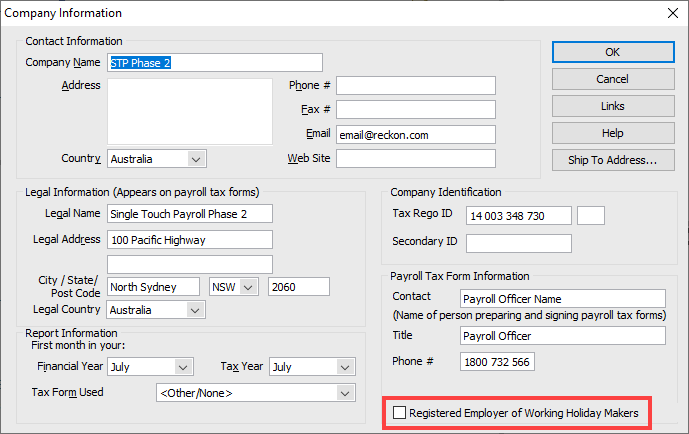
The checkbox to indicate if the company is a Registered Employer of Working Holiday Makers is used for STP Phase 2 reporting purposes only.
For example, use
8-No TaxC and enter the correct Tax Rate for a Registered/Unregistered WHM employer.Registered Employer for Working Holiday Makers
A new checkbox option in Reckon Accounts to identify if the entity is a Registered Employer of Working Holiday Makers (WHM).
The option will not affect any calculations but it will be used to create the Tax Treatment Code for your WHM employee and reported in each STP event.
Previous BMS ID
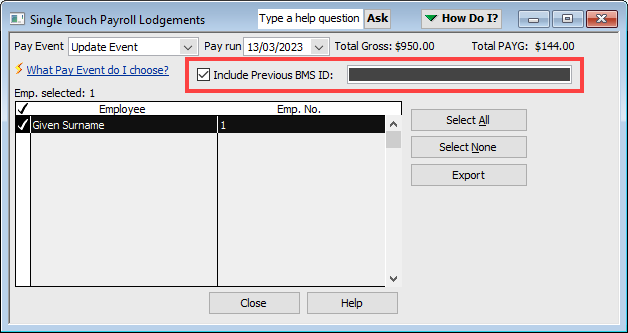
When an entity changes payroll solution, they have to report the Previous BMS ID to the ATO.
The Previous BMS ID will only need to be reported to the ATO once after the change during an Update Event.
Need more help?
Ask the Reckon Community at: https://community.reckon.com/categories/reckonaccounts
Or
Log a Support Ticket: https://www.reckon.com/au/support/
