How to locate the message ID of a failed email in Reckon Accounts Hosted.
Legacy KB ID: 5313
Question
How do I find the message ID of a failed email in Reckon Accounts Hosted?
Answer
MessageID is the last line of the block of information for that email transmission in the email log file located at Q:\Log.
The file is called QBMailClient_yyyymmdd
To view this file:
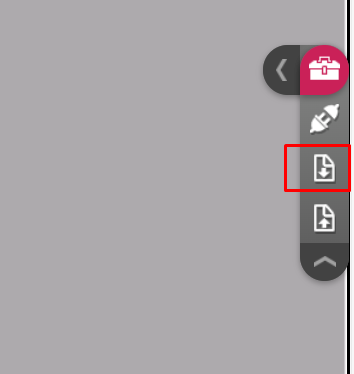
1. Click the Tool Box and click the Download icon
2. Browse to Q:>Log
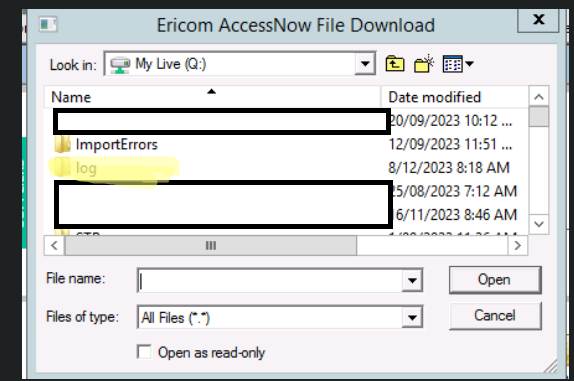
3. Select the file QBMailClient_yyymmdd for the day the email was sent and click on Open. It will download to your local PC.
4. Select Open (with Notepad) to see the contents of the file. Information for one email transmission is:
=================================================
12:51:11 PM sending...
=================================================
mail.From = accountshosted@reckon.com
mail.To = community@reckon.com.au
mail.CC =
mail.Bcc = community@reckon.com.au
mail.Subject = Invoice from Sams Sports Store
mail.ReplyTo = admin@samsports.com.au
mail.Send = AWS SendRawEmail .....
mail.ReturnPath = accountshosted@reckon.com
mail.MessageId = 0000014e75dfbb00-7ae1f9f4-a6a3-4e98-8de1-8e34205c08cb-000000
_____________________________________________________________________
5. Mail.MessageId is the last line (this line was not available in previous versions)
6. Note also the sending time and the top of the block
Additional Information
A new log file is created when the first email of the day is sent, and is updated throughout the day. A new file is created each day. If no email is sent on a particular day no log file is created. Log file creation is not triggered by logging on or off. If you upgrade from R1 to R2 during the day, a new log file is not created.
The last 4 log files are displayed. On the 5th day, the oldest log file is overwritten.
Need more help?
Ask the Reckon Community at: https://community.reckon.com/reckon.
