ABA file being rejected by bank
Legacy KB ID: 1129
Question
When I attempt to import the ABA file created in Reckon Accounts, why do I receive various errors in my online banking software resulting in the ABA file being rejected?
Reported errors:
There are various reasons why this error (or others depending on the bank) may occur:
- APCA number missing from the file
- QuickBooks Legal company name missing from ABA file
- The Bank requires a balance record included in the file.
- The Bank requires a valid supplier reference
Answer
APCA number missing from the file
- Click on the Edit menu and choose Preferences.
- Scroll up to the Banking icon and click on Company Pref.
- Make sure your APCA number appears in that field.
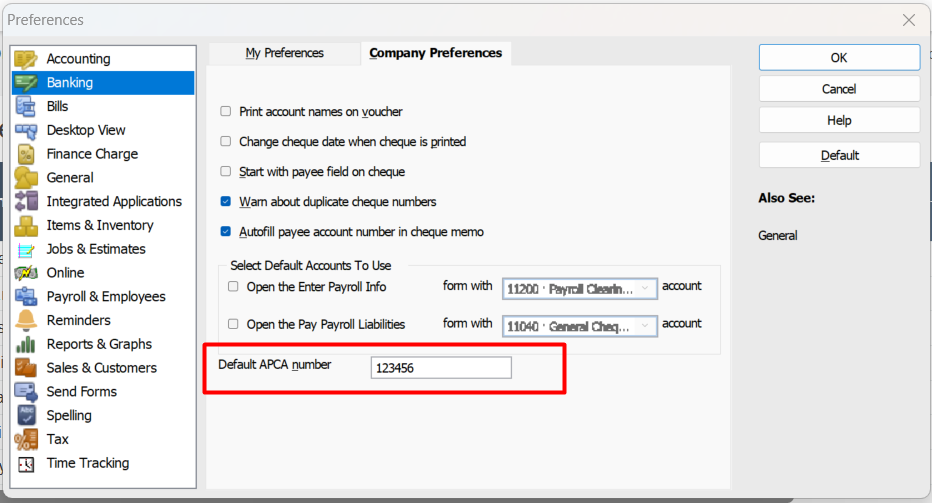
You will need to re-enter the transactions that have been created for online banking and regenerate the ABA file to include the APCA number.
Reckon Accounts Legal company name missing from ABA file
- Click the Company menu and choose Company Information.
- Make sure you have your company's legal name displayed in the Legal Name field.
- If the name does appear in there, you should retype this and Tap to the next field by using the Tab key on your keyboard.
- Click OK to save the changes.
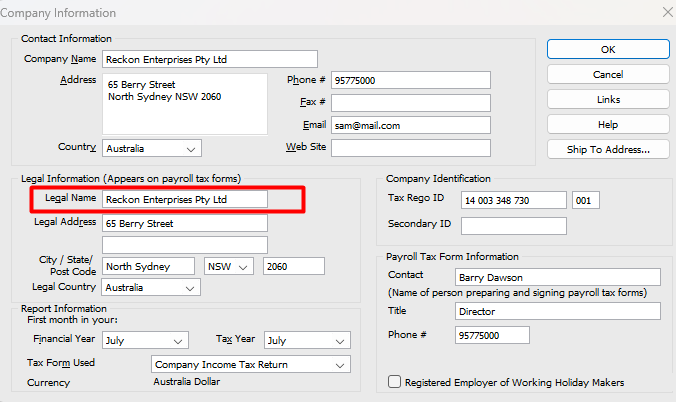
You will need to re-enter the transactions that have been created for online banking and regenerate the ABA file to include the Company's legal name.
Bank requires a balance record included in the file
Some banks require the ABA file to include a Balance Record;
- Bring up the Chart of Accounts and edit the bank account that you use to do the online banking.
- Click on the Account Detail tab, and tick the Include Balance Record.
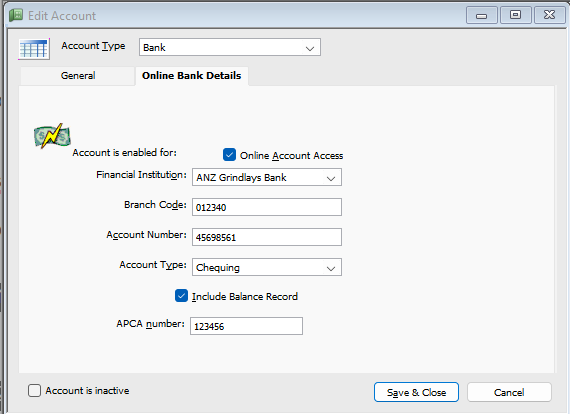
You'll need to confirm with your bank if this is a requirement of their software.
Need more help?
Ask the Reckon Community at: https://community.reckon.com/categories/reckonaccounts
Or Log a Support Ticket: https://www.reckon.com/au/support/
