Table of Contents
STP Phase 2 - Tax Tracking Type changes in Reckon Accounts
Payroll Items
There will be no automated updates on your existing Payroll Items during the upgrade of your Company file to Reckon Accounts 2023. It is the obligation of the Payroll person to ensure that the Payroll Items are updated in accordance to the ATO STP Phase 2 requirements.
These changes can be made individually per Payroll Item, or we recommend utilising the Migration Assistant to perform bulk updates. There is also a Prefill option that is available in the Migration Assistant to prefill data where there is some certainty on how the Payroll Item must be set.
However, take note that a newly created Payroll Item is assigned with the default Tax Tracking Type based on STP Phase 2 requirements for:
- Annual Leave
- Personal Leave
- Paid Parental Leave
- Overtime
- Bonus and Commissions
Tax Tracking Types
STP Phase 2 reporting will extract information from certain fields in the Company file. One of the requirements is the Disaggregation of Gross, where ATO requires you to differentiate between different payroll item types and classify them accordingly.
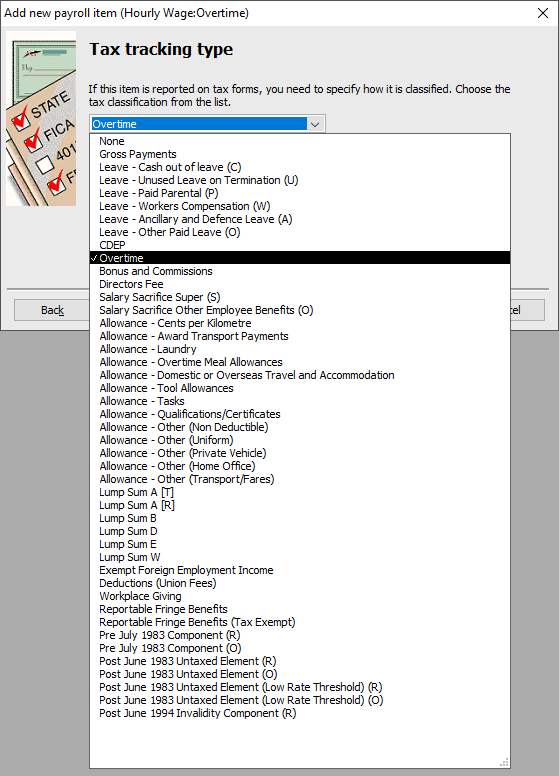
Reckon Accounts 2023 has expanded the different tax tracking types into:
Gross Pay Items
TAX TRACKING TYPE | DESCRIPTION |
Overtime | When an employee works extra time and can include work done:
|
Bonus and Commissions | Payments to reward their performance, service or for meeting a specific goal. |
Directors' Fees | Payments to:
|
Allowances
The existing Allowance Tax Tracking Types have been updated to STP Phase 2 during the upgrade process. These are the only types that were updated in Reckon Accounts 2023 as the Tax Tracking Types have been repurposed.
These are the direct conversion of the previous Allowance types:
STP Phase 1 | STP Phase 2 |
Allowances - Car | Allowance – Cents per Kilometre |
Allowances - Transport | Allowance – Award Transport Payments |
Allowances - Meal | Allowance – Overtime Meal Allowances |
Allowance - Travel | Allowance – Domestic or Overseas Travel and Accommodation |
Allowances - Laundry | Allowance - Laundry |
Allowances - Other | Allowance – Other (General) |
The supported Allowance types in Reckon Accounts are:
TAX TRACKING TYPE | DESCRIPTION |
Allowance – Cents per Kilometre | Applies to deductible expense allowances paid to employees using their own car at a set rate for each kilometre travelled for business purposes that represents the vehicle running costs including registration, fuel, servicing, insurance and depreciation. |
Allowance – Award Transport Payments | Deductible expense allowances for the total rate specified in an industrial instrument to cover the cost of transport for business purposes. Example:
|
Allowance – Overtime Meal Allowances | Deductible expense allowances defined in an industrial instrument that are in excess of the ATO reasonable amount, paid to compensate the employee for meals consumed during meal breaks connected with overtime worked. |
Allowance – Domestic or Overseas Travel and Accommodation | Deductible expense allowances that are paid for domestic or overseas meals and incidentals and domestic accommodation, undertaken for business purposes, which is intended to compensate employees who are required to sleep away from home. |
Allowance - Laundry | This is a deductible expense allowance paid to employees for washing, drying and ironing uniforms required for business purposes. |
Allowance – Tool Allowances | Deductible expense allowances to compensate an employee who is required to provide their own tools or equipment for business purposes. Example:
|
Allowance - Tasks | A services' allowance that is paid to compensate an employee for specific tasks or activities performed that involve additional responsibilities, inconvenience, or circumstances above the base rate of pay. Example:
|
Allowance – Qualifications/Certificates | Deductible expense allowances that are paid for obtaining or maintaining a qualification, which is evidenced by a certificate, licence or similar, and is required to perform the work or services. Example:
|
Allowance – Other (Non Deductible) | These will be allowances related to an expense which is not work-related, not for business purposes, or is for private purposes. |
Allowance – Other (Uniform) | Deductible expense allowances related to uniforms. |
Allowance – Other (Private Vehicle) | Deductible expense allowances related to the employee travelling in a private vehicle. |
Allowance – Other (Home Office) | Deductible expense allowances related to the employee maintaining a home office (such as allowances to assist with initial set up or running costs). |
Allowance – Other (Transport/Fares) | Deductible expense allowances related to the employee travelling on public transport, or in taxis and ride-share services. |
Allowance – Other (General) | Deductible expense allowances that don't belong in one of the other codes above. |
Paid Leave
Leave payments made to employees will now be reported separately. The supported Leave types in Reckon Accounts are:
PAID LEAVE | DESCRIPTION |
Leave – Cash out of leave (C) | Pay out leave entitlements in lieu of your employee taking the absence from work. Example:
|
Leave – Unused Leave on Termination (U) | Payments to your employees for unused leave on termination. |
Leave – Paid Parental (P) | All types of paid parental leave must now be reported separately. Examples:
|
Leave - Workers Compensation (W) | Some employers pay workers' compensation to their employees, and in other circumstances the insurer makes the payment directly to the employee. Examples:
|
Leave – Ancillary and Defence Leave (A) | There are a range of leave types that are paid while employees participate in volunteer or community activities. Examples:
|
Leave – Other Paid Leave (O) | All forms of paid absences should be reported as Other paid leave (paid leave type O) unless they are required to be itemised using another leave type. Examples:
|
Lump Sum
There are two changes to Lump Sum payments:
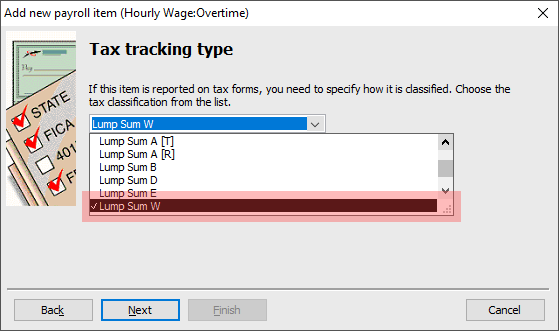
- The introduction of a new Category: Lump Sum W to report on 'Return to Work Payments'
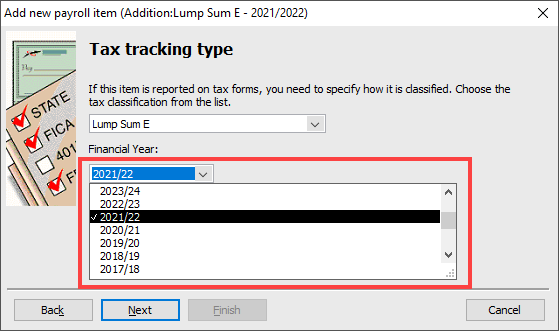
- Each Financial Year relevant to the Lump Sum E payment must be reported
The Lump Sum W is available as a Tax Tracking Type in Reckon Accounts.
The Financial Year can now be set for Lump Sum E in the Payroll Item window.
Salary Sacrifice
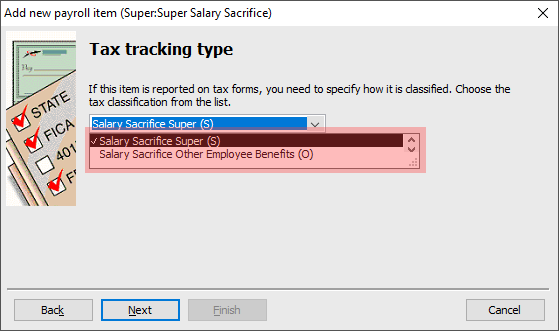
Salary Sacrifice arrangements are now required to be reported separately. To accommodate this, a new Tax Tracking Type can now be set for Super Payroll Items in Reckon Accounts.
- Salary Sacrifice from Super to a complying fund or Retirement Savings Account (RSA)
- Salary Sacrifice from Other Employee Benefits
Need more help?
Ask the Reckon Community at: https://community.reckon.com/categories/reckonaccounts
Or Log a Support Ticket: https://www.reckon.com/au/support/
