Table of Contents
STSL Tax Table Update in Reckon Accounts - Effective 24 September 2025 for Australian Payroll
About the September Tax Table Update for STSL
On 2 August 2025, the Universities Accord (Cutting Student Debt by 20 Per Cent) Bill 2025 became law.
In response, ATO released updated tax tables for employees with Study and Training Support Loans (STSL).
This was published on 11 August 2025 and takes effect from 24 September 2025.
Key information
- Applies to employees with an STSL (Study and Training Support Loans).
- Compulsory repayments are now reduced under a marginal repayment system.
- Updated formulas are included in Schedule 8 (NAT 3539) and PAYG tax tables.
- Effective for payments made on or after 24 September 2025.
- No changes apply to past payments.
Important Note for Reckon Accounts Users
Reckon Accounts supports payroll processing for the Current and Previous Financial Year, and applies tax tables based on the Payment Date of the pay run.
Once the September Tax Table Update is installed, it will apply to all pays for the current financial year, dated between 1 July 2025 and 30 June 2026.
This means:
- If you process a pay run after 24 September, and the payment date is within the 2025/26 financial year, Reckon will use the updated tax tables, including the new STSL formulas.
- This applies even if the pay period is before 24 September — the key factor is the payment date, not the period worked.
- Therefore, any pays dated before 1 July 2025 will continue to use the previous financial year’s tax tables, regardless of when they are processed.
Users need to watch out for:
- Backpay or corrections for pays originally dated before 24 September may now be calculated using the updated STSL rates, which could result in over- or under-withholding.
- Users should review and manually adjust PAYG tax if necessary, especially for employees with STSL.
- Use ATO tools for accurate calculations or verification if needed:
- STSL Weekly Tax Table (to be updated on September 2025)
- Schedule 8 Formulas
How to apply the update in Reckon Accounts
DESKTOP USERS
This update is required for all Reckon Accounts Desktop installations that process payroll. Please ensure you have administrator permissions before applying the update.
Only Administrators or users with Payroll permissions can perform Payroll data update actions in Single User Mode.
Only Administrators or users with Payroll permissions can perform Payroll data update actions in Single User Mode.
To download and apply the update:
- Ensure an internet connection is available.
- Go to Employees menu and select Get Latest Tax Tables
- Review the Reckon Accounts Payroll Update notification showing the Tax Table Version update from 2526341 to 2526342
- Click OK to continue
- Confirm the new version in Tax Table Information
Notifications & reminders
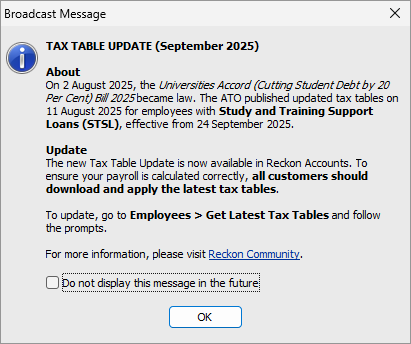
- A Broadcast Message will appear when opening your company file to notify you of the update.
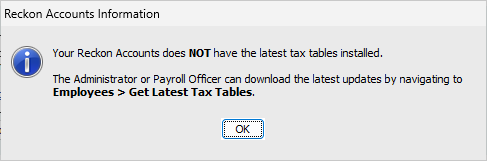
- A warning will also appear during pay runs if Reckon Accounts detects that a newer tax table version is available.
HOSTED USERS
No action is required. The application will be automatically updated by 24 September 2025. Simply launch Reckon Accounts Hosted as normal.
More information
Visit Accounts Hosted - Reckon Community page.
