Table of Contents
- Print Preview of Adjustment Note shows overlapping fields for Multi-Currency files
- Unrecoverable Error when duplicating invoice to Sales Order with insufficient stock
- Incorrect ‘Created On’ Date in Audit Company File
- QBWIN.log in does not show Duplicate Elements
- Help content not displayed for BAS/IAS
- Australia only
- Expanded, updated, and arranged the Financial Institution list
- Hide Inactive items in Adjust Quantity/Value on Hand
- Removed the Unit of Measure for Group type item
- BCC Line added to ‘Select Forms To Send’ preview pane
- Updated Clean Up data messaging to be more clear
- Updated link for ‘Suggest New Feature’ option
- Australia only
What's New on the latest Reckon Accounts Hosted R1 - AU
- Print Preview of Adjustment Note shows overlapping fields for Multi-Currency files
- Unrecoverable Error when duplicating invoice to Sales Order with insufficient stock
- Incorrect ‘Created On’ Date in Audit Company File
- QBWIN.log in does not show Duplicate Elements
- Help content not displayed for BAS/IAS
- Australia only
- Expanded, updated, and arranged the Financial Institution list
- Hide Inactive items in Adjust Quantity/Value on Hand
- Removed the Unit of Measure for Group type item
- BCC Line added to ‘Select Forms To Send’ preview pane
- Updated Clean Up data messaging to be more clear
- Updated link for ‘Suggest New Feature’ option
- Australia only
The latest Reckon Accounts introduces exciting new features, bug fixes, and enhancements based on customer feedback.
For Australian users, it includes important compliance updates, legislative changes, and the latest PAYG Tax Scales for the 2025/26 Financial Year.
New features
Updating your Superannuation rate
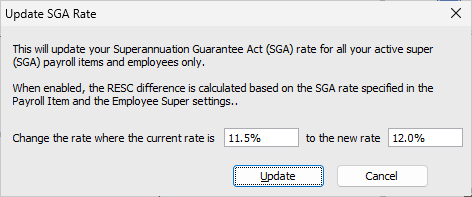
Update SGA Rate
Until Reckon Accounts 2024, each release included updated Superannuation rates, automatically detected and applied by the system when processing payroll for the new financial year.
With the latest Reckon Accounts Business Range, users can now independently update their Super rates. This can be done by selecting Update SGA Rate from the Employees menu, which displays the following options:
- Current Rate field: Displays the current Super rate.
- New Rate field: Allows entry of the new Super rate.
- Update button: Updates the current rate with the new rate. This applies only to the SGA Super payroll item type in the Payroll Item List and the Rate on the Super Details section of the Employee card.
- Cancel button: Cancels the action and closes the window.
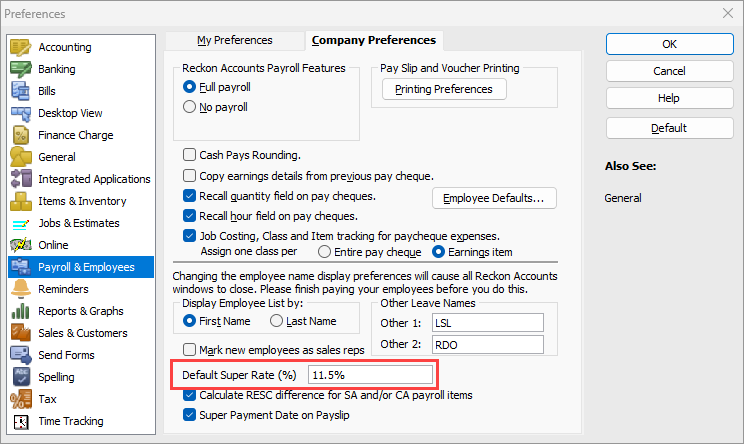
Default Super Rate
A new Default Super Rate (%) field is available in the Payroll & Employees Preferences, with a default value of 11.5%.
This value is used when creating new SGA Super payroll item types.
Users can still adjust the Super rates individually for different payroll items and employees. Standard warning dialogues will continue to appear if the rate is set to a value less than or greater than this default amount.
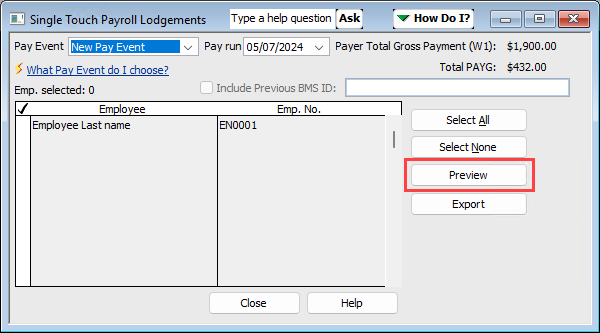
Added a Preview button in the STP Lodgements window
A new "Preview" button has been added to the Single Touch Payroll Lodgements window.
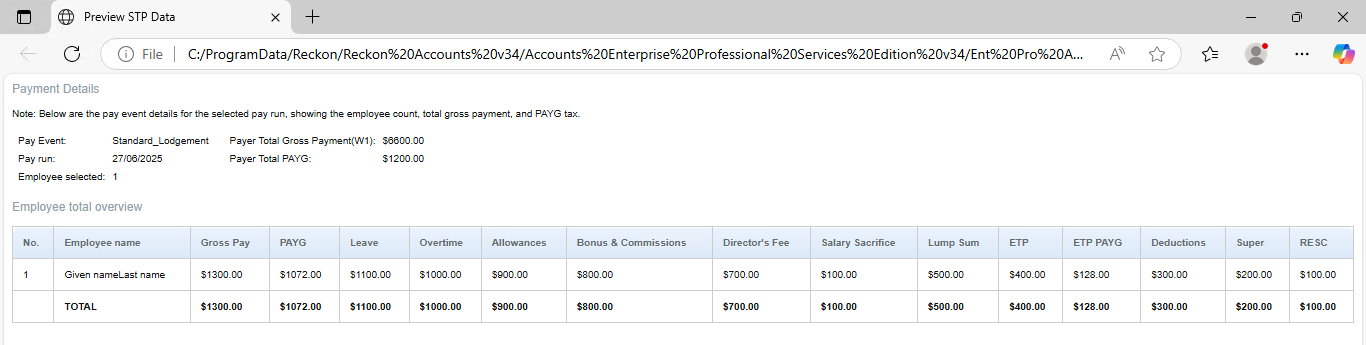
When selected, the preview of your STP data for the chosen employees will be displayed in your default browser. It provides a Payment Details summary:
- Pay Event Type
- Pay Run Date
- Payer Total Gross Payment (W1)
- Payer Total PAYG, and
- The number of employees selected.
And an Employee total overview with detailed information in a table for each employee record with a total row at the end.
This is the basis of the STP file for upload to Reckon GovConnect and submission to the ATO, allowing you to reconcile data between Reckon Accounts and GovConnect.
This will replace the deprecated Payment Summary report, with all its previous options now removed.
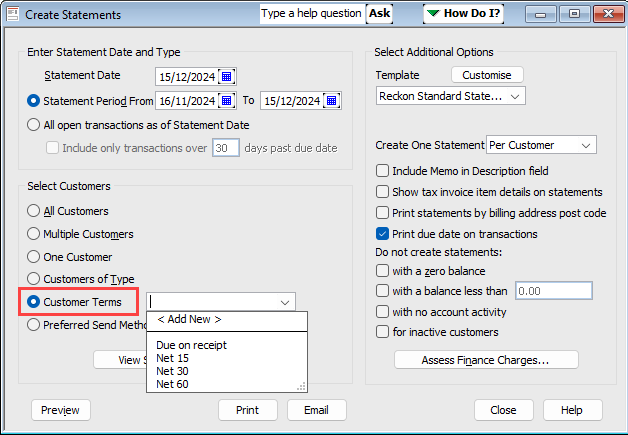
Allow to filter Customer Statements by Terms
A new Customer Terms dropdown is added to the Create Statements window.
This dropdown will display all available terms from the Terms List. When a term is selected, only customers matching the selected condition based on the Customer card will be included in the Preview, Print, or Email process.
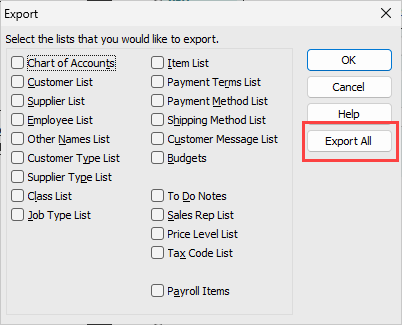
Add "Export All" button to IIF Export
A new "Export All Lists" button is added to the IIF Export feature, allowing users to quickly select and export all lists.
When clicked, it will opens the file explorer for you to save the file that contains all the list selections. This enhancement will streamline the export process instead of selecting each list individually.
Ability to import and export Overtime Payroll Items
Previously, when exporting and importing hourly wage payroll items, Overtime Pay types were being converted to Regular Pay without applying the appropriate multiplier.
To resolve this, two new columns — Overtime Type and Overtime Multiplier — have been added to the IIF file. These ensure that Overtime Payroll Items are correctly identified and imported, preserving both the pay type and multiplier.

Broadcast messaging
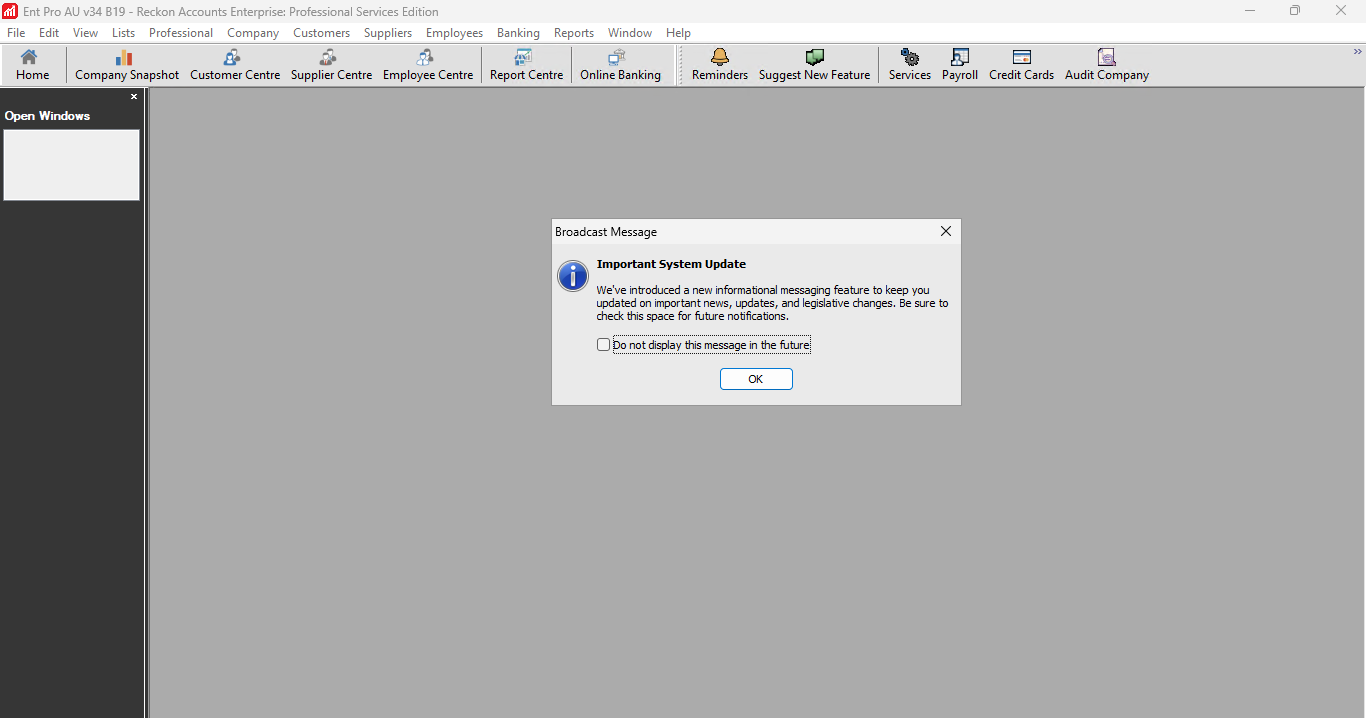
A new "lightweight" informational messaging capability has been introduced in-product.
This feature allows us to reach users with updates, news, important legislative changes, and other key announcements.
Messages will be displayed to each user. While the dialogue can be dismissed, it will reappear when the company file is reopened until “Do not display this message in the future” is selected.
Please note that any new messages will automatically display, so you won’t miss important updates.
Compliance update (AU)
Updated rates to support multiple Tax Table across two financial year
The PAYG Tax Scales have been updated:
- Payment Date before 01 July 2025 – uses the Financial Year 2024/25 tax scales.
- Payment Date on or after 01 July 2025 – uses the Financial Year 2025/26 tax scales.
State payroll threshold update (AU)
Northern Territory (NT)
- Effective 1 July 2025, the payroll tax rate for Northern Territory remains at 5.50%.
- However, the payroll tax threshold is increased from $1,500,000 to $2,500,000.
Victoria (VIC)
- Effective 1 July 2025, the payroll tax rate for Victoria remains at 4.85%.
- However, the payroll tax threshold is lifted from $900,000 to $1,000,000.
State Revenue Office VICTORIA — Payroll tax current rates | State Revenue Office (sro.vic.gov.au)
NORTHERN TERRITORY Government — Payroll tax | Department of Treasury and Finance
Resolved bugs
Print Preview of Adjustment Note shows overlapping fields for Multi-Currency files
In a multi-currency enabled file, previewing the adjustment note shows overlapping text in the "Payments/Credits" and "Balance Credit" fields, affecting both available templates (Custom Adjustment Note and Return Receipt).
Files without multi-currency enabled are not affected. The issue has been resolved by deleting the overlapping fields and updating the templates.
For upgraded Multi-Currency files, please see Textbox overlap in Custom Templates on Multi-Currency Files upgraded from Reckon Accounts 2024
Unrecoverable Error when duplicating invoice to Sales Order with insufficient stock
An unrecoverable error occurs when duplicating an invoice created from a sales order with no quantity on hand. This impacts workflows involving stock management, particularly when invoicing out-of-stock items and generating sales orders. This has been resolved by introducing a dialogue so that the process should proceed without crashes, ensuring consistent inventory warnings.
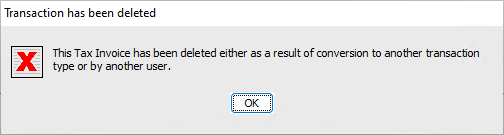
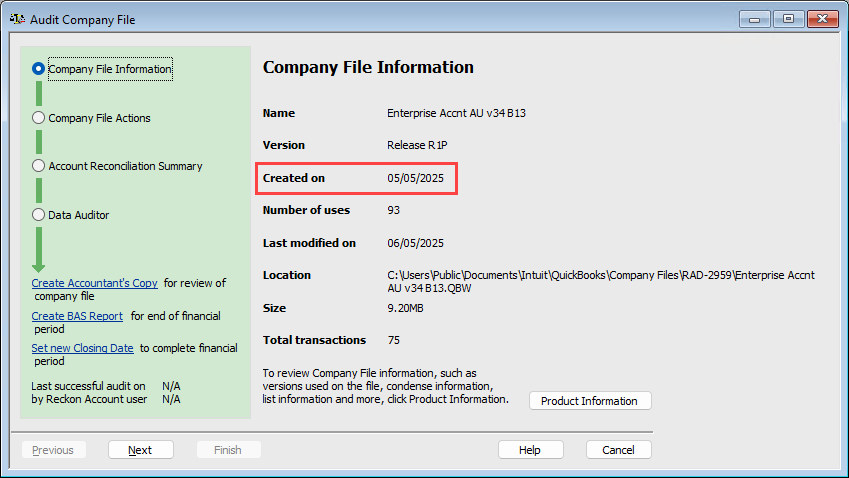
Incorrect ‘Created On’ Date in Audit Company File
Fixed an issue where the ‘Created on’ date in the Audit Company File dialog was incorrectly displayed. Previously, this field showed the ‘Last modified on’ date instead of the actual file creation date. The ‘Created on’ date will now correctly reflect when the company file was first created.
QBWIN.log in does not show Duplicate Elements
Fixed an issue where the verify_rebuild_data.log (qbwin.log) in Hosted did not display duplicate elements for the same company file, unlike in Desktop. Now, the Verify and Rebuild Data logs in Hosted will correctly display duplicate ID test results, ensuring consistency with Desktop.
Help content not displayed for BAS/IAS
Fixed an issue where clicking the question mark (?) icon on the BAS/IAS form did not open the relevant help content. Previously, the help window would briefly flicker but fail to display the information. Now, clicking the question mark (?) will correctly open the help topic as expected.
Australia only
State Payroll Tax Detail Report shows employees in incorrect States
The State Payroll Tax Detail Report was showing employees in the wrong states. This issue, similar to one found in QuickBooks 2011/12, has been fixed. The report now correctly lists employees by state with the correct number of pay runs, while the State Payroll Tax Summary Report was unaffected.
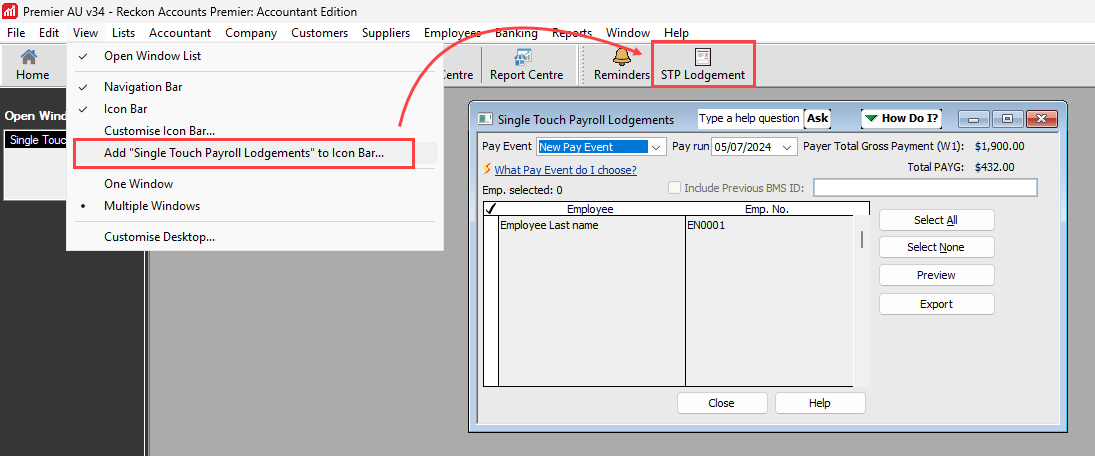
Adding 'STP Lodgements' to the icon bar adds 'Print Payment Summaries' shortcut instead
Fixed an issue where adding the 'Single Touch Payroll Lodgement' to the Icon Bar created a shortcut for 'Print Payment Summaries,' causing the wrong window to appear when using the shortcut to process STP. This has been resolved.
Enhancements
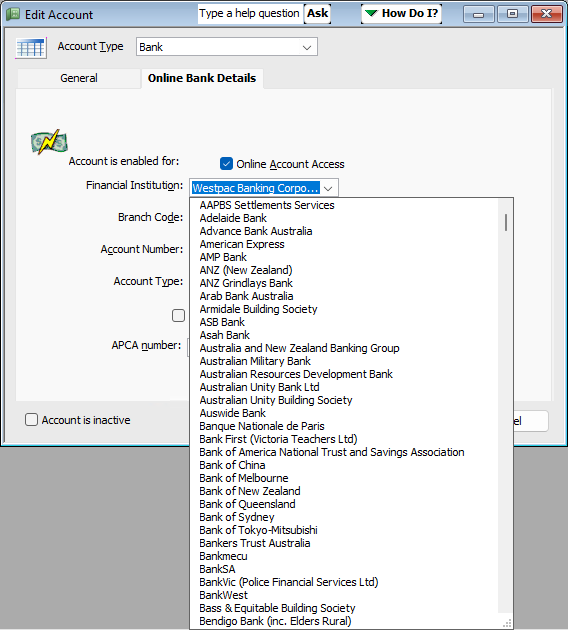
Expanded, updated, and arranged the Financial Institution list
Added 28 new financial institutions and their corresponding bank codes, bringing the total to 121. The dropdown list is now sorted alphabetically by bank name.
New Financial Institution
Bank Name | Bank Code |
Australian Military Bank | ADC |
Australian Unity Bank Ltd | CRU |
Bank First (Victoria Teachers Ltd) | CUS |
Bank of Sydney | LBA |
BankVic (Police Financial Services Ltd) | CUS |
Beyond Bank Australia | CRU |
Defence Bank | CRU |
Delphi Bank | BCY |
G&C Mutual Bank (SGE Mutual Ltd) | SGE |
Gateway Bank Ltd | GTW |
Horizon Bank (Horizon Credit Union) | CRU |
Judo Bank Pty Ltd | JUD |
Liberty Financial Pty Ltd | CRU |
ME Bank (Members Equity Bank Pty Ltd) | MEB |
MOVE Bank (Railways Credit Union Ltd) | RCU |
MyState Bank | CRU |
P&N Bank (Police & Nurses Ltd) | PNB |
Police Bank Ltd | PCU |
QBANK (QPCU Ltd) | CUS |
Qudos Bank (Qudos Mutual Ltd) | CUS |
RACQ Bank (Members Banking Group Ltd) | QTM |
Rural Bank | BBL |
Sumitomo Mitsui Banking Corporation | SMB |
Teachers Mutual Bank Ltd | TCU |
Tyro Payments Ltd | MSL |
UBank (div. of National Australia Bank) | NAB |
Unity Bank Ltd | MMP |
Vision Super Pty Ltd | CRU |
Updated Financial Institution
Bank Name | Bank Code | Changes |
Auswide Bank | BAY | Wide Bay Capricorn Building Society changed its name to Auswide Bank in 2015. |
Greater Bank (Greater Building Society) | GBS | Renamed |
Heritage Bank (Heritage Building Society) | HBS | Renamed |
Hume Bank (Hume Building Society) | HUM | Hume Building Society officially changed its name to Hume Bank Limited in 2011. |
ING Bank (Australia) | ING | Renamed |
Newcastle Permanent | NEW | Renamed |
Standard Chartered Bank | SCB | Renamed |
Hide Inactive items in Adjust Quantity/Value on Hand
Inactive items currently appear in the Adjust Quantity/Value on Hand window. This update will ensure inactive items are hidden, simplifying inventory adjustments and reducing clutter.
Removed the Unit of Measure for Group type item
The U/M Set field for the Unit of Measure in a Group type item is not retained after saving. This field has not functioned since 2018 and has now been removed.
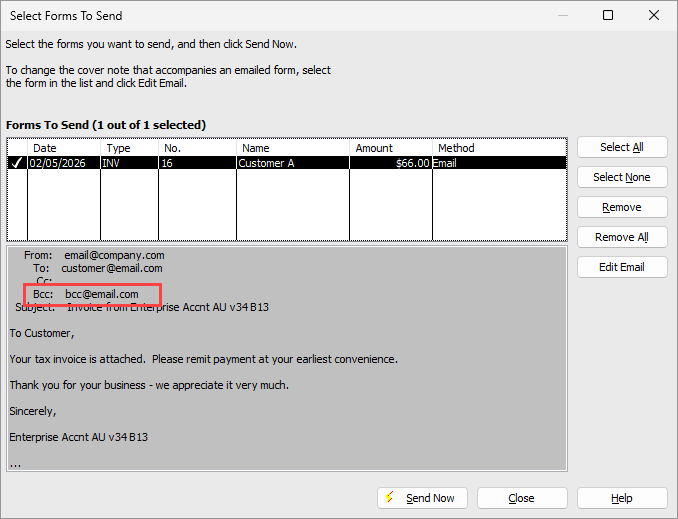
BCC Line added to ‘Select Forms To Send’ preview pane
Updated the ‘Select Forms To Send’ window to include a BCC line in the preview pane, displayed below the CC field. The BCC value is now pulled from the Send Forms Preferences based on the selected email type.
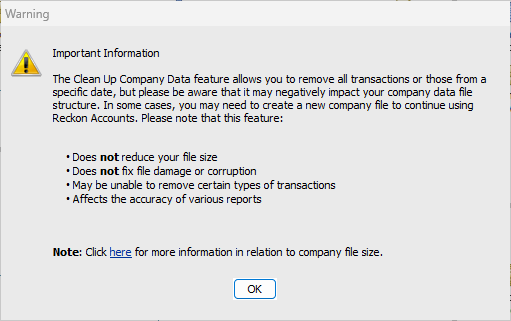
Updated Clean Up data messaging to be more clear
The Clean Up Company Data feature in Reckon Accounts creates an archived copy of the company data file and/or cleans up data by removing transactions, replacing them with monthly summary journal entries, or simply removing all transactions.
While reducing file size is a result of using this feature, it is not the primary intention.
To clarify this process, we have introduced a dialogue that appears when the feature is selected. We have also hidden the option for non-accountant editions.
Updated link for ‘Suggest New Feature’ option
The ‘Suggest New Feature’ option from the Help menu, now directs users to the Reckon Community Ideas page: https://community.reckon.com/categories/reckonaccountsideas.
Australia only
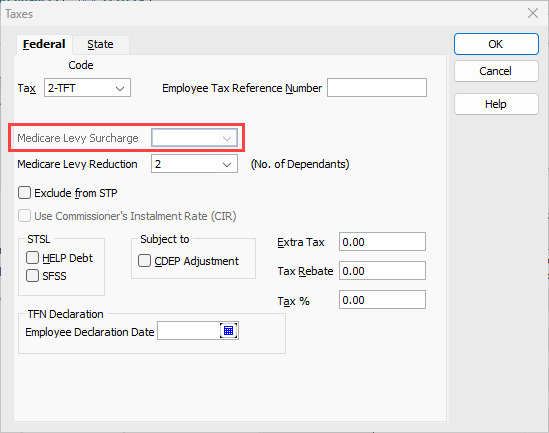
MLS dropdown is not disabled when MLR is set
The Medicare Levy Surcharge (MLS) dropdown remains enabled even when Medicare Levy Reduction (MLR) is selected. Since users can have either MLS or MLR, but not both, the MLS dropdown should automatically disable when MLR is set, similar to how MLR disables when MLS is selected.
This issue has been resolved, ensuring the MLS dropdown is disabled when MLR is active.
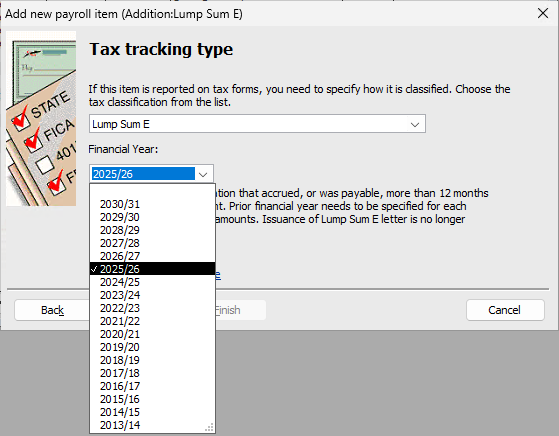
Add more Financial Years to Lump Sum E dropdown
Updated the Lump Sum E dropdown, which currently ends at 2025/26, to include five additional financial years until 2030/31.
Removed the Hire Employee option from Employee Organizer
Due to changes in ATO Single Touch Payroll, the old Employee Organizer is no longer relevant for hiring or creating new employees. Since this function was outdated and too complex to update, it has been removed.
API/SDK changes
No API/SDK changes for this release.
