Error when adding Super Guarantee and Salary Sacrifice
Question
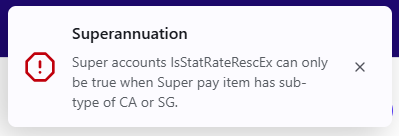
I am unable to add Super Guarantee and Salary Sacrifice (or other Super item like Employer Additional) at the same time under the same Superannuation Fund and getting the following error:
"Super accounts IsStatRateRescEx can only be true when Super pay item has sub-type of CA or SG."
Answer
Untick Statutory rate RESC exempt in the Pay setup page
The Issue
There is a known issue/bug in the latest Reckon One release. Our product development team is working on a permanent fix but in the meantime there is a workaround outlined below.
Workaround
When adding the superannuation fund details to an employee;
- Enter the Superannuation fund and Fund product
- Select either the Super Guarantee (or Collective Agreement) type item
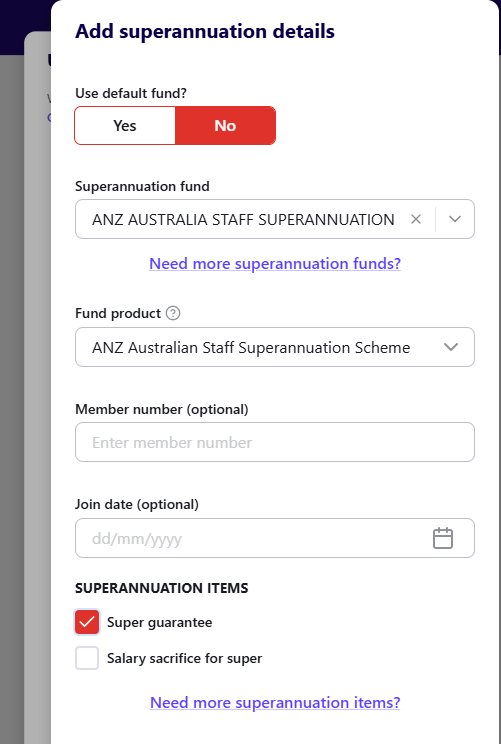
- Click Done to save
- Open the employee record and go to Edit details.
- On the Pay set up page, press the pencil icon to edit the superannuation details

- Untick the Statutory rate RESC exempt setting

- Click Done, then Save and Finish
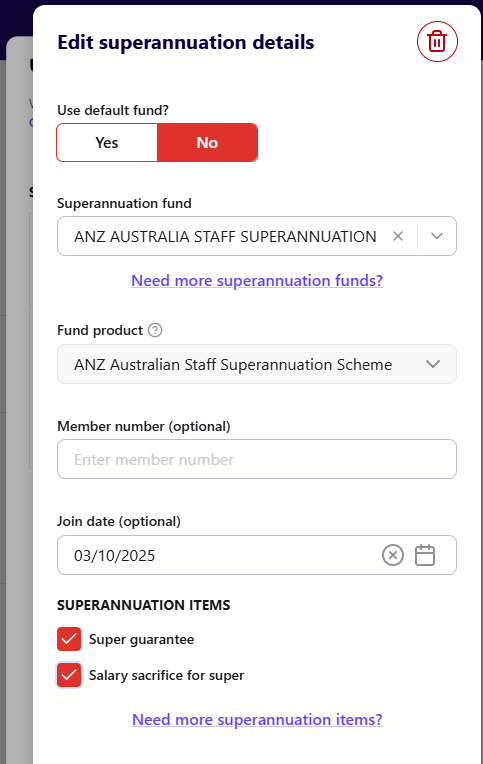
- Return to the employee’s superannuation details.
- Edit the existing fund details and select the additional super items to add to the fund.
Need more help?
Ask the Reckon Community at: https://community.reckon.com/categories/reckonaccounts
Or Log a Support Ticket: https://www.reckon.com/au/support/
