Table of Contents
Automation error in POS Desktop after Windows 11 24H2 Update
Issue
Following the Windows 11 24H2 updates, some Reckon POS Desktop Administrator and/or Terminals are experiencing:
- Random buffer overflow or automation errors, especially during key events like transaction finalisation.
- Errors may includes extreme negative integer values (~ -2,000,000,000).
- Errors can lead to disconnection from the terminal or POS crashing entirely.
- Occurrence is inconsistent (e.g., every 3 days on one site), but highly disruptive.
Cause
The Windows 11 24H2 update disables Mailslots by default, which is a messaging mechanism that Reckon POS relies on for inter-process communication.
This can trigger buffer overflows or automation errors, especially during events like real-time event handling (e.g., after payments).
Solution
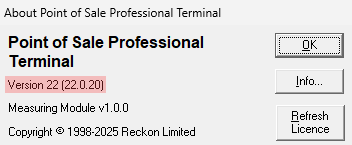
We’ve released POS Version 22, Build 20 (October 2025), which includes a new messaging system that resolves previous issues.
Earlier builds included temporary fixes like extra error logging and disabled messaging. This update provides a permanent solution. To check your version, go to Help > About in your POS software. The last two digits should read 22.0.20.
Earlier builds included temporary fixes like extra error logging and disabled messaging. This update provides a permanent solution. To check your version, go to Help > About in your POS software. The last two digits should read 22.0.20.
Detailed Steps
- Download the latest Reckon Point-Of-Sale v22 here - which contains the latest fix and diagnostic feature. Note: Try other browsers if you are having trouble downloading from your current.
- Install this build on all machines that run POS Terminal and Administrator.
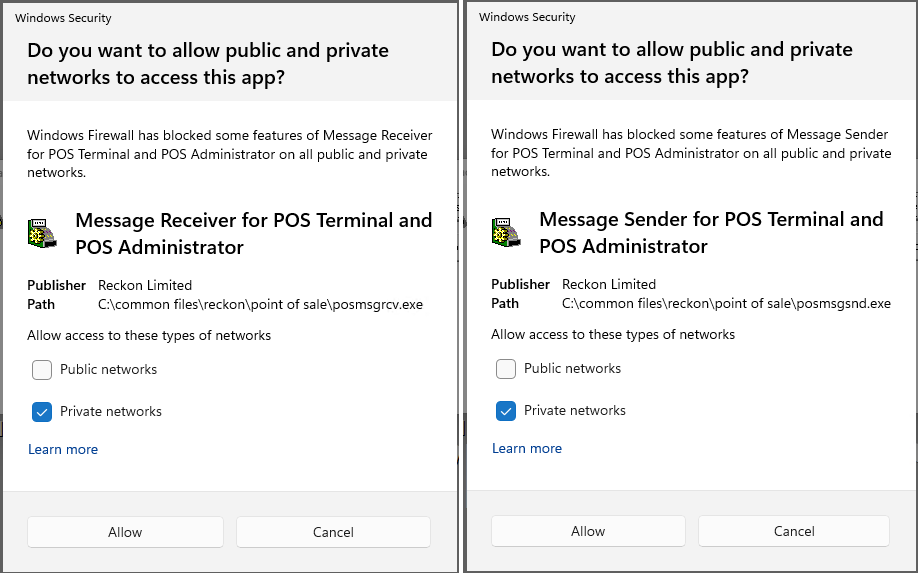
- When running POS Terminal and Administrator for the first time, you will need to accept the Windows Security messages like below for Message Receiver and Message Sender.
If your POS database is shared and users access other POS machines using network credentials, network sharing settings may affect connectivity.
You can review these settings via: Control Panel → Network & Internet → Network and Sharing Center → Change advanced sharing settings → All Networks.
We recommend consulting your IT administrator before making any changes to these options.
You can review these settings via: Control Panel → Network & Internet → Network and Sharing Center → Change advanced sharing settings → All Networks.
We recommend consulting your IT administrator before making any changes to these options.
