STP Pay Event Types in Reckon Accounts
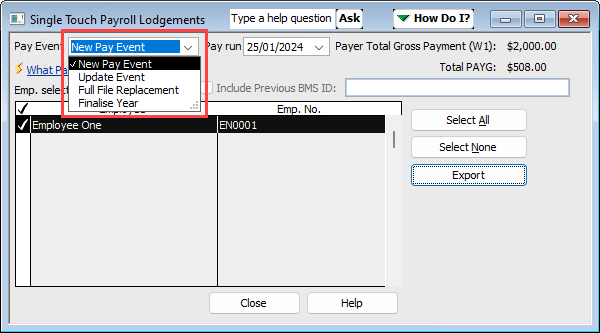
In this knowledge article, we will explain the different types of Pay Events of STP available in Reckon Accounts (Desktop and Hosted) that you have to choose before you export the STP report and report to the ATO using GovConnect.
Pay Event Types
Pay Event Types in Single Touch Payroll (STP) describe what kind of payroll information you're sending to the Australian Taxation Office (ATO). Every time you send payroll data from Reckon Accounts to the ATO via GovConnect, it tells the ATO why you're sending that data such as new pay run, corrections, replacements or End of Financial Year finalisations.
New Pay Event
A new pay event is a regular STP submission after processing a new pay run, it's purpose is to let your employees' current pay details such as gross wages, PAYG withholding, and superannuation and their Year-To-Date (YTD) values are send to the ATO.
Use this event when you are going to submit a pay run for the first time to the ATO. In GovConnect select New Pay Run / Full File Replacement, when uploading.
Update event
A update event is when a submission is used to update or correct previously reported information from your pay runs that may have had the incorrect information in the employees details or income made during that pay period. This is used to fix YTD figures that were reported incorrectly in earlier pay events e.g. an incorrect gross, PAYG, or super amount.
You should only make corrections with an update event after you have made the initial first lodgment to the ATO. In GovConnect select Update a previously completed ATO subbmission or Finalise Year, when uploading.
Full File Replacement (FFR)
A full file replacement based STP submission will replace your most recent pay event submission and send the latest values of your employees data and YTD values to the ATO. It's used to correct a pay event that was rejected or contained major errors (wrong pay run or employees entered).
It should only be used to replace the last pay event submitted and cannot be used to replace older events. In GovConnect select New Pay Run / Full File Replacement, when uploading.
Finalisation Event (Finalise Year)
This pay event is used exclusively for the End of Financial Year declaration to the ATO to close out the year. It's purpose is to confirm that all the payroll data for the year is complete and correct, it tells the ATO that employees income statements in MyGov are 'tax ready' as well.
You should only use this type of STP submission after your last pay run for the financial year, once all your corrections and adjustments are done for the financial year. In GovConnect select Update a previously completed ATO subbmission or Finalise Year, when uploading.
Need more help?
Ask the Reckon Community at: https://community.reckon.com/
Or Log a Support Ticket: https://www.reckon.com/au/support/
