Table of Contents
Earnings calculation methods and STP reporting in Reckon One
Learn about the different tax calculation methods you can choose when setting up earnings items in Reckon One, when to use them and how they'll affect your Single Touch Payroll (STP) reporting for the item. This article covers all earnings items, except for Termination type earnings items used for processing Eligible Termination Payments (ETP).
Overview
When you set up an earnings item in Reckon One and you select the Tax applicable checkbox, you get the option to choose a calculation method for the tax on that item. This choice affects not only how the tax is calculated on the item (and what you might need to do when processing it through a pay run), but also how it's reported to the Australian Tax Office (ATO) under Single Touch Payroll (STP).
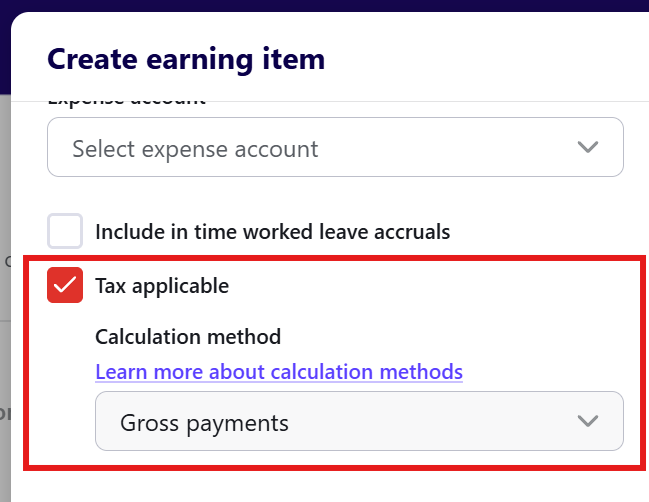
Understand calculation methods and reporting of earnings
This table outlines each calculation method and what it's typically used for, as well as how it reports to the ATO under STP.
Calculation method | Typically used | STP reporting category for earnings items |
Tax free | For non-taxed items. An alternative would be to leave the Tax applicable checkbox unselected when you create the item. | Not reported |
Gross payments | For ordinary payments for the current pay period. | Depends on the earnings type - see tables below. |
Additional payment method A | For paying an employee an additional payment such as a bonus, commission or back payment, where the ATO’s rules for that payment type specify Additional Payment Method A. The purpose is to calculate the additional PAYG withholding while taking the employee’s normal earnings into account, rather than treating the additional payment as if it were ordinary wages on its own. Learn more about this method from the ATO. | Depends on the earnings type - see tables below |
Additional payment method B (i) | When an employee receives a back payment that relates to specific pay periods within the current financial year. Learn more about this method from the ATO. | Depends on the earnings type - see tables below |
Additional payment method B (ii) | For back payments relating to a previous financial year, or for additional payments such as bonuses and commissions that don't relate to a single pay period. Learn more about this method from the ATO. | Lump sum E |
Return to work | When an employer pays an individual a payment to encourage them to resume working for that employer or another entity. For example, a former employee is offered a lump-sum payment as an incentive to return to work. For more information, see Schedule 4 from the ATO. | Lump sum W |
When reporting category depends on earnings type
If you select Gross payments, Additional payment method A or Additional payment method B(i), the STP reporting category will depend on the Earnings type selected when you create an earnings item.
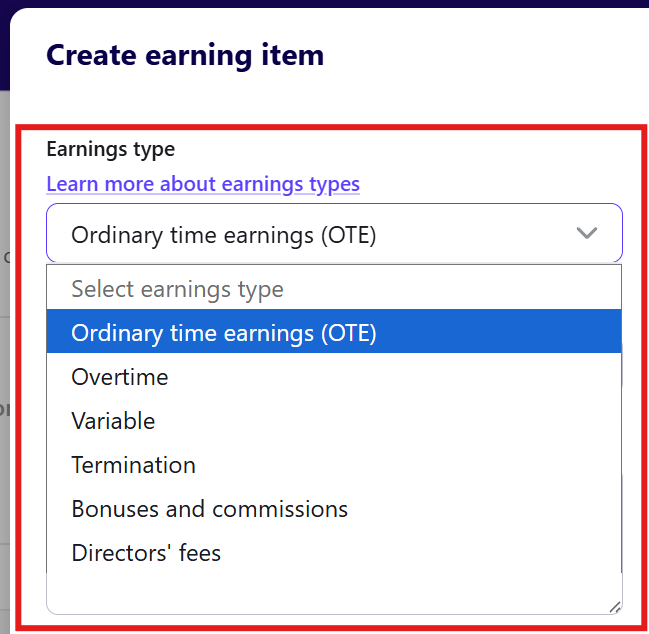
OTE and variable
This table shows the STP reporting category for each calculation method for OTE and variable earnings types:
Calculation method | STP reporting category |
Tax free | Not reported |
Gross payments | INB Gross |
Additional payment method A | INB Gross |
Additional payment method B (i) | INB Gross |
Additional payment method B (ii) | Lump sum E (same as for other earnings types) |
Return to work | Lump sum W (same as for other earnings types) |
Overtime
This table shows the STP reporting category for each calculation method for overtime earnings type:
Calculation method | STP reporting category |
Tax free | Not reported (same as for other earnings types) |
Gross payments | Overtime |
Additional payment method A | Overtime |
Additional payment method B (i) | Overtime |
Additional payment method B (ii) | Lump sum E (same as for other earnings types) |
Return to work | Lump sum W (same as for other earnings types) |
Bonuses and commissions
This table shows the STP reporting category for each calculation method for Bonuses and commissions earnings type:
Calculation method | STP reporting category |
Tax free | Not reported (same as for other earnings types) |
Gross payments | Bonuses & Commissions |
Additional payment method A | Bonuses & Commissions |
Additional payment method B (i) | Bonuses & Commissions |
Additional payment method B (ii) | Lump sum E (same as for other earnings types) |
Return to work | Lump sum W (same as for other earnings types) |
Directors' fees
This table shows the STP reporting category for each calculation method for Directors' fees earnings type:
Calculation method | STP reporting category |
Tax free | Not reported (same as for other earnings types) |
Gross payments | Directors fee |
Additional payment method A | Directors fee |
Additional payment method B (i) | Directors fee |
Additional payment method B (ii) | Lump sum E (same as for other earnings types) |
Return to work | Lump sum W (same as for other earnings types) |
Implications for processing a pay run
Your choice of calculation method also affects whether you need to enter additional tax withheld for earnings items in the pay run. Reckon One does not calculate the tax withholding amount for items with a calculation method of:
- Additional payment method A
- Additional payment method B(i)
- Additional payment method B(ii)
- Return to work
If you use these methods, you'll need to enter the additional tax withheld for these pay items in the pay run. If there is just one pay item requiring this, a Tax withheld field will show. If there are multiple pay items, a Lump sums tax item will appear.
