Table of Contents
Edit, delete, or close a bank account in Reckon One
Learn how to edit, close, or delete bank accounts in Reckon One.
The steps outlined in this article are for customers with accounting plans. If you have a payroll plan, we recommend you manage your bank accounts in Payroll settings.
Edit a bank account
To edit bank account details, including the account display name, opening date and balance, bank, account name, number and BSB, and bank payment (ABA file) settings:
- In the Banking menu, select Bank accounts.
- Next to the bank account you want to update, click More, then select Edit account.
- Update the required details (not all of these will show if the account is a cash or clearing account):
- Account name
- BSB
- Account number
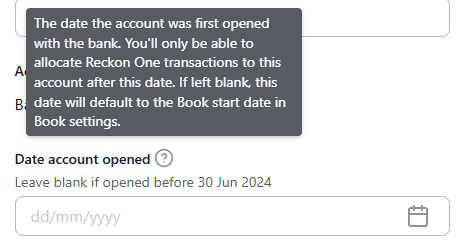
- Date account opened. This is the date the account was first opened with the bank, and you will only be able to allocate Reckon One transactions (like payments or receipts) to this bank account after this date. If the account was opened before the Book start date in Book settings (which will be shown above the Date account opened field), leave it blank and it will default to the Book start date.
- Opening balance.
- Click Save and close.
Close a bank account
Closing a bank account stops new transactions from being added after a specific date, disconnects any bank feeds, and keeps existing transactions available to view. Closed accounts can be reopened at any time. To close a bank account:
- In the Banking menu, select Bank accounts.
- Next to the bank account you want to update, click More, then select Edit account.
- Select Close account.
- Enter a date in Date account closed.
- Select Close account.
To see closed accounts on the bank accounts screen, you'll need to make sure the Show closed accounts checkbox is selected.
Delete a bank account
Deleting a bank account permanently removes it and disconnects any associated bank feeds. Deleted accounts can’t be recovered. To delete a bank account:
- In the Banking menu, select Bank accounts.
- Next to the bank account you want to delete, click More, then select Edit account.
- Select Delete account.
- On the confirmation message, select Delete account.
Read more
- Learn how to reopen a closed bank account
- Learn how to set a lock off date for a bank account to prevent transaction activity
