Table of Contents
Enable and disable estimates in Reckon One
Learn how to enable and disable estimates in Reckon One, so you can provide quotes to customers and convert these into invoices.
Estimates is disabled by default in Reckon One. You must enable estimates before you can create them.
This feature is available on all accounting and Reckon Ultimate plans.
Enable estimates
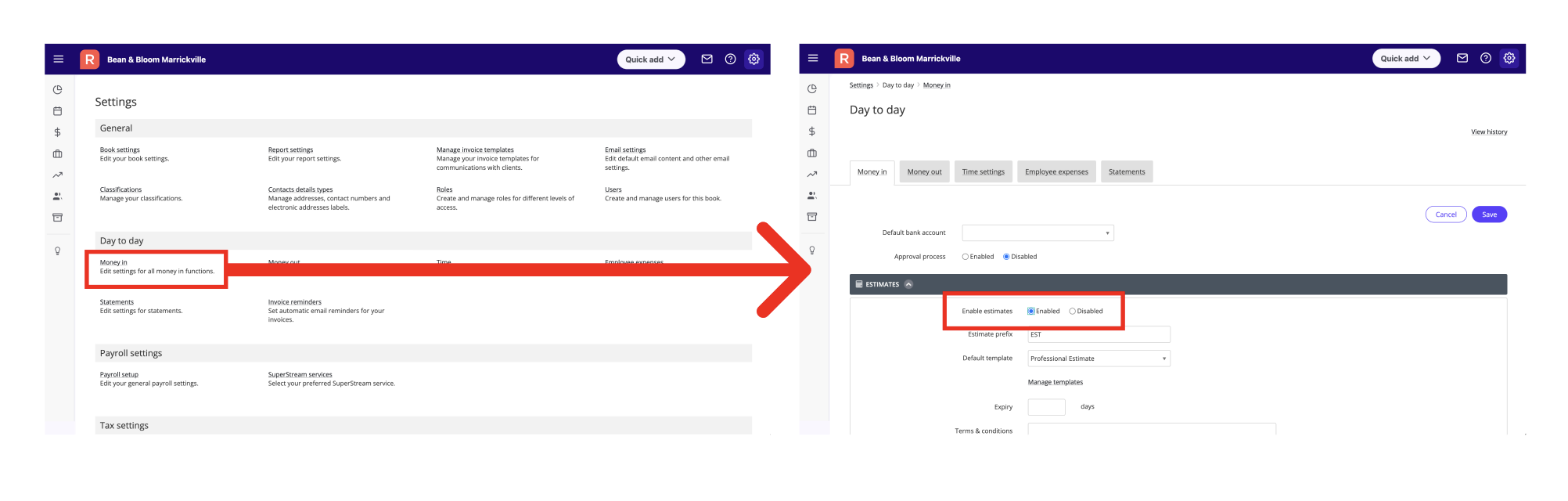
To enable estimates in Reckon One:
- Go to the Settings menu (cog icon in top right hand corner then from the drop down menu select Settings).
- Click on Money in under the Day to day section.
- Click on the drop down arrow next to Estimates.
- Switch the Enable estimates toggle to Enabled.
Disable estimates
If you no longer require estimates in Reckon One, you can disable this feature. Once disabled, you won't be able to create estimates, but you will still be able to see estimates already created in the Estimate List report.
- Go to the Settings menu (cog icon in top right hand corner then from the drop down menu select Settings).
- Click on Money in under the Day to day section.
- Click on the drop down arrow next to Estimates.
- Switch the Enable estimates toggle to Disabled.
Read more
- Learn more about estimates in Reckon One
- Learn how to customise estimate templates
Need more help?
Ask the Reckon Community at: https://community.reckon.com/categories/reckonone
Or
log a Support Ticket: https://www.reckon.com/au/support/
