v35R1.1 - Release Note
Overview
This release continues our Payday Super (Qualifying Earnings) updates ahead of the 1 July 2026 start date. v35 R1.1 makes it easier to check that Qualifying Earnings and super are set up consistently across your payroll items, and fixes a case where QE wasn't being applied to payments in lieu of notice. We recommend reviewing both items below if you process payroll.
New: Add the Super Contributions column to the Payroll Item List
You can now add a Super Contributions column to the Payroll Item List, alongside the existing Qualifying Earnings column. This lets you review, at a glance, which payroll items are flagged for Qualifying Earnings (QE) and which attract super — side by side.
This is a useful check, because QE should generally only be enabled on items where super is being paid. Seeing both columns together makes inconsistent setups easy to spot.
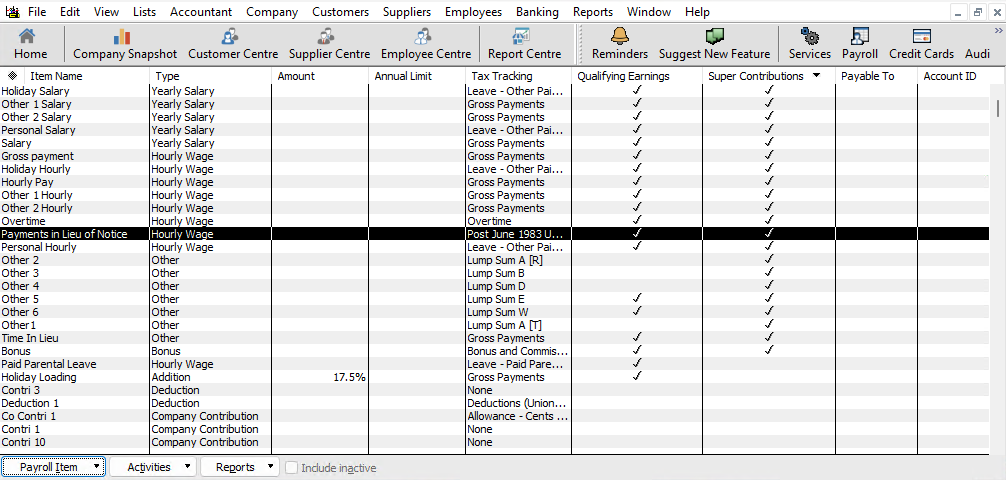
Adding the Super Contributions column
- Open the Payroll Item List from the menu (List => Payroll Item List)
- Open the Payroll Item button
- Click on Customise Columns
- Find the Super Contributions column in the left list and click Add >>
- Click Ok
Fix: Qualifying Earnings now available on the "Post June 1983 Untaxed Element" wage type
Previously, Qualifying Earnings could not be enabled on the Post June 1983 Untaxed Element (Low Rate Threshold) (O) wage type. This wage type is used for payments in lieu of notice, which do attract QE. This has now been corrected in v35 R1.1.
If you're on a version earlier than R1.1 and use this wage type, you'll need to apply the fix by replacing three program files. See Updating Reckon Accounts Desktop (v35): Replacing DLL Files to Enable QE on the "Post June 1983 Untaxed Element" Wage Type for step-by-step instructions.
