Table of Contents
Hosted API - 10 March 2020
Overview
We've released exciting new features and enhancements of Hosted API that will help you get the best out of Reckon Accounts Hosted via API.
New Company Files list endpoint
You have asked for it and now you have it!
You can now get the list of Company files (saved in both Q drive or shared folder) of a Reckon Accounts (RA) Hosted user account and their filePath 🙌.
Your users will no longer need to go to RA Hosted application to get their File's location and then paste it in your application.
You can now present their list of files in a drop-down menu to choose from. You can then save the selected filePath and then add it to your payloads.
This reduces human error and your users will be able to integrate with RA Hosted quickly.
fileName in the /userfiles endpoint response gives you the exact name of the company file.We recommend you to present a Company file selection drop-down menu to your users from the response of this endpoint response. You will then map the selected item's
filePath to the FileName object for the subsequent Hosted API payloads.Endpoint
https://api.reckon.com/RAH/V2/userfiles
Method
GET
Header
- Authorization:
Bearer {{token}} - Content-Type:
application/json
Sample Response
{
    "numberOfFiles": 2,
    "availableFiles": [
        {
            "fileName": "File from Q Drive.QBW",
            "filePath": "Q:\\File from Q Drive.QBW",
            "lastWrite_datetime": "2020-02-26T04:34:05.025Z"
        },
        {
            "fileName": "Shared File.QBW",

            "filePath": "\\\\RAH-HG-FSS-90\\063659-1573258-SharedFile\\Shared File.QBW",
            "lastWrite_datetime": "2020-02-12T03:13:47.806Z"
        }
    ]
}
New Transfer request endpoint
You can now send Transfer request to via Hosted API to transfer funds from one account to another.
It will be available with the Desktop versions from Reckon Accounts 2020 R1 onwards (due for release late March 2020).
Supported Request Types
- Add
- Mod
- Query
For detailed documentation, please visit this link and choose:
- Max SDK version: 13
- Format: qbXML
- Select Message: Transfer Add/Mod/Query
Sample Payloads
Add
<?xml version="1.0"?>
<?qbxml version="6.1"?>
<QBXML>
    <QBXMLMsgsRq onError="continueOnError">
        <TransferAddRq>
            <TransferAdd>
                <TxnDate >2020-02-26</TxnDate>
                <TransferFromAccountRef>
                    <ListID >800001FD-1582685808</ListID>
                    <FullName >Suspense Account</FullName>
                </TransferFromAccountRef>
                <TransferToAccountRef>
                    <ListID >800001FE-1582685814</ListID>
                    <FullName >Bank Account</FullName>
                </TransferToAccountRef>
                <Amount >3000.00</Amount>
                <Memo >Fund transfer</Memo>
            </TransferAdd>
        </TransferAddRq>
    </QBXMLMsgsRq>
</QBXML>
Mod
<?xml version="1.0"?>
<?qbxml version="6.1"?>
<QBXML>
    <QBXMLMsgsRq onError="continueOnError">
        <TransferModRq>
            <TransferMod>
                <TxnID >FD-1582687473</TxnID>
                <EditSequence >1582687473</EditSequence>
                <TxnDate >2020-02-26</TxnDate>
                <TransferFromAccountRef>
                    <ListID >800001FD-1582685808</ListID>
                    <FullName >Suspense Account</FullName>
                </TransferFromAccountRef>
                <TransferToAccountRef>
                    <ListID >800001FE-1582685814</ListID>
                    <FullName>Bank Account</FullName>
                </TransferToAccountRef>
                <Amount >12000.00</Amount>
                <Memo >Edited Bannk Transfer 4</Memo>
            </TransferMod>
        </TransferModRq>
    </QBXMLMsgsRq>
</QBXML>
Query
<?xml version="1.0"?>
<?qbxml version="6.1"?>
<QBXML>
    <QBXMLMsgsRq onError="continueOnError">
        <TransferQueryRq />
    </QBXMLMsgsRq>
</QBXML>
Supported Account Types
Just like the UI of Reckon Accounts application, below are the supported Account types which can be used for Transfer request via Hosted API.
- Bank
- Other current asset
- Fixed asset
- Other asset
- Credit card
- Other current liability
- Long term liability
- Equity
Support for Gross Amount
You can now pass Gross amount instead of Net amount for the below transaction types.
To be able to send Gross amounts, you will need to send <IsTaxIncluded> true </IsTaxIncluded> with your payload.
Supported transaction types
- Journal
- Cheque
- Credit Card Charges
- Credit Card Credit
Sample payload
<?xml version="1.0"?>
<?qbxml version="6.1"?>
<QBXML>
    <QBXMLMsgsRq onError="stopOnError">
        <JournalEntryAddRq requestID = "4.1.1">
            <JournalEntryAdd>
                <TxnDate>2019-08-06</TxnDate>
                <RefNumber>4.1.1</RefNumber>
                <IsAdjustment>false</IsAdjustment>
                <IsTaxIncluded>true</IsTaxIncluded>
                <JournalCreditLine>
                    <AccountRef>
                        <ListID>80000041-1210240662</ListID>
                        <FullName>Accounts Receivable</FullName>
                    </AccountRef>
                    <Amount>110.00</Amount>
                    <Memo>Accounts Receivable Credit Line</Memo>
                    <EntityRef>
                        <ListID>80000009-1210244039</ListID>
                        <FullName>ICU Investments</FullName>
                    </EntityRef>
                    <ItemSalesTaxRef>
                        <ListID>80000009-1210234750</ListID>
                        <FullName>GST</FullName>
                    </ItemSalesTaxRef>
                </JournalCreditLine>
                <JournalDebitLine>
                    <AccountRef>
                        <ListID>80000038-1210240392</ListID>
                        <FullName>Bank Cheque Account</FullName>
                    </AccountRef>
                    <Amount>110.00</Amount>
                    <Memo>CBank Cheque Account Debit Line</Memo>
                </JournalDebitLine>
            </JournalEntryAdd>
        </JournalEntryAddRq>
    </QBXMLMsgsRq>
</QBXML>
CountryVersion enhancement
We understand how hard it is to keep on updating CountryVersion in your application and also asking users to choose the new option if they have upgraded to the new version of RA Hosted application.
With this release, you no longer need to pass the CountryVersion with your payloads. 🙌
However, if a user is using the New Zealand version then they need to open their company file at least once using the RA Hosted application if you are not sending the CountryVersion anymore for the Hosted API to find out the version information.
To overcome this issue and if you support customers on the New Zealand version, you can just pass the below values for CountryVersion and you will just pass the country code. You can show a drop-down menu to your users to choose from and you will never have to update it with the new product version number anymore.
Country code:
- AU
- NZ
FAQs
- What will happen if I pass CountryVersion in my payloads?
- If you pass the
CountryVersionin your payload but RAH API already knows about it, your passed value will be overwritten. However, if we don't have the information, your information (if it's valid) will be used.
- If you pass the
- Why do I get "Could not start Reckon Accounts" error if I don't pass
CountryVersion?- You will get this error if the user has never opened the file in RA Hosted (applies to New Zealand version only) and you didn't pass the
CountryVersionvalue.
Resolution: The user just needs to open the file once in RA Hosted application to resolve it or you send AU/NZ in theCountryVersionif you support users from New Zealand as well.
- You will get this error if the user has never opened the file in RA Hosted (applies to New Zealand version only) and you didn't pass the
Support for RA Hosted User Name
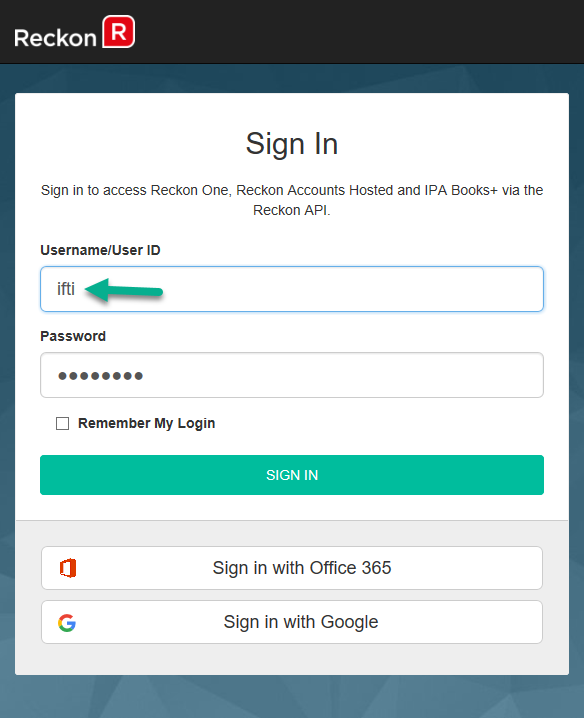
This is another highly requested feature. Users can now login to Reckon Identity Server with their RA Hosted User Name (for example: john), instead of logging with their User ID (for example: 1234567-1). 🙌.
Support for multiple shared folders with the same company file name
If you have multiple shared folders with the same shared folder name, you can now send your call to the right company file by passing the full path of the file.
For example:
"FileName": "\\\\RAH-HG-FSS-90\\063659-1573258-SharedFile\\Shared File.QBW"
Error messages enhancements
We have updated some of the error messages so that it is clearer for the user and you to resolve them faster.
Error codes
Some of the error messages will now give you an error code for faster troubleshooting. For example: E01.
User is already logged in to the file via the application
"E01: The Reckon Accounts company file User Name you have specified is already logged in to the company file. This User Name must be logged out of the company file or another User Name specified."
File is in single user mode
E02: Reckon Accounts is currently in Single User mode. You must switch to Multi User mode for Hosted API access.
Wrong Company file Username and/ Password supplied with the payload
E03: Failed to access the Reckon Accounts company file using the supplied credentials.
Wrong/invalid CountryVersion and/ FileName
E04: Could not start Reckon Accounts to process your request. Please verify the path to the company file included in your request.
If you have any questions, please get in touch with the Reckon API Support team by emailing apisupport@reckon.com.
