Table of Contents
Invoices API v1
Overview
Invoices API v2 endpoints provides you with more information about your Invoices.
The Invoices endpoint can be found at: https://api.reckon.com/R1/{BOOKID}/invoices
Methods supported: GET, POST, PUT, DELETE
The Book ID represents the unique GUID of the Book the user wants to write data to. For example, c1b3da90-e9df-4d57-8cfb-71a1d7bfe401
Reckon One Module | Endpoint | Additional Parameter(s) | HTTP Method | Description | API Portal | Countries |
Invoices | Invoices | /invoiceId | GET | Retrieve an invoice by its unique ID. More information is returned to you when you search for an invoice by ID. | AU/NZ/UK | |
Invoices |
| GET | Retrieve the list of [customer] invoices | AU/NZ/UK | ||
Invoices |
| POST | Create a [customer] invoice | AU/NZ/UK | ||
Invoices |
| POST with AutoCalcTax | Create a [customer] invoice with minimal data as Reckon calculates the tax and invoice amounts for you. |
| AU/NZ | |
Invoices | Invoices | /invoiceId /approve | POST | Approve a [customer] invoice in a book. Only required if the invoices module level is 'medium' | AU/NZ/UK | |
Invoices | Invoices | /invoiceid | PUT | Update an Invoice | AU/NZ/UK | |
Invoices | Invoices |
| DELETE | Delete a [customer] invoice | AU/NZ/UK |
Sample GET
Endpoint: https://api.reckon.com/R1/{BOOKID}/invoices
Method: GET
{
"Id":"007beb13-028c-42b5-acd3-b9f871283407",
"CashbookID":"c1b3da90-e9df-4d57-8cfb-71a1d7bfe401",
"InvoiceNumber":"INV0047",
"InvoiceOrder":43,
"Balance":5.0000,
"CustomerID":"492c0830-99ee-481f-9596-23f15b8ebed9",
"CustomerName":"J customer",
"InvoiceAmount":5.0000,
"InvoiceDate":"2015-03-23T00:00:00+00:00",
"DueDate":"2015-04-04T00:00:00+00:00",
"Status":2,
"Reference":null,
"Notes":null,
"IsOverdue":true
}
Sample POST
Endpoint: https://api.reckon.com/R1/{BOOKID}/invoices
Method: POST
{'CustomerId':'9b4b615f-2815-4f9c-a765-d7f8517cea6a',
'AmountTaxStatus':2,
'InvoiceAmount':2.0000,
'InvoiceDiscountAmount':null,
'InvoiceDiscountPercentage':null,
'InvoiceTax':0.1800,
'Notes':null,
'PaymentDetails':null,
'Reference':null,
'TemplateId':'3edc5b6f-37aa-4516-8c1e-3cf268bf51e6',
'InvoiceDate':'2016-03-07T00:00:00',
'SendDate':null,
'DueDate':null,
'Address':null,
'TaxSummaryText':null,
'LineItems':
[
{
'ParentInvoiceLineItemId':null,
'BillableId':null,
'DiscountAmountExTax':null,
'DiscountAmountTax':null,
'DiscountPercent':null,
'Amount':2.00,
'InvoiceDiscountedAmountExTax':1.8200,
'InvoiceDiscountedTaxAmount':0.1800,
'HasDataForPosting':true,
'IsSubTotal':false,
'IsParent':false,
'IsHidden':false,
'AccountId':'00000000-0000-0000-0000-000000000000',
'PrintGroupAsSingleLine':false,
'ChargeableItemId':'8cd53f00-f6b9-4d6c-891d-83cc6a348e40',
'LineNo':1,
'Description':'SD',
'Quantity':null,
'UnitPriceExTax':1.8181818182,
'UnitPriceTax':0.1818181818,
'UnitPriceIsTaxInclusive':false,
'TaxGroupId':'e6015088-28f5-4bfe-8085-ff9fc2564efa',
'TaxIsModified':false,
'TaxAmount':0.1800,
'AmountExTax':1.8182
}
]
}
Sample POST with AutoCalcTax = true
There is an old dev saying... "never work with animals... and numbers!". Numbers are even more difficult in accounting software where various global tax calculations (VAT / GST etc..) come into play. Issues also arise where the third-party app doesn't have a concept of tax, or Net amounts (Net Amount + Tax Amount = Gross Amount).
We have therefore sprinkled some magic dust over the API to make this a lot easier for our partners. Below are the POSTs that will accept the AutoCalcTax parameter. We have also worked on reducing the number of required data objects for an invoice post, so we have included some examples below as well.
AutoCalcTax does not work on invoices with discounts due to the complex nature of those calculations. You will need to pass the full payload to achieve this POST.
Sample Minimum payloads for POSTing an Invoice
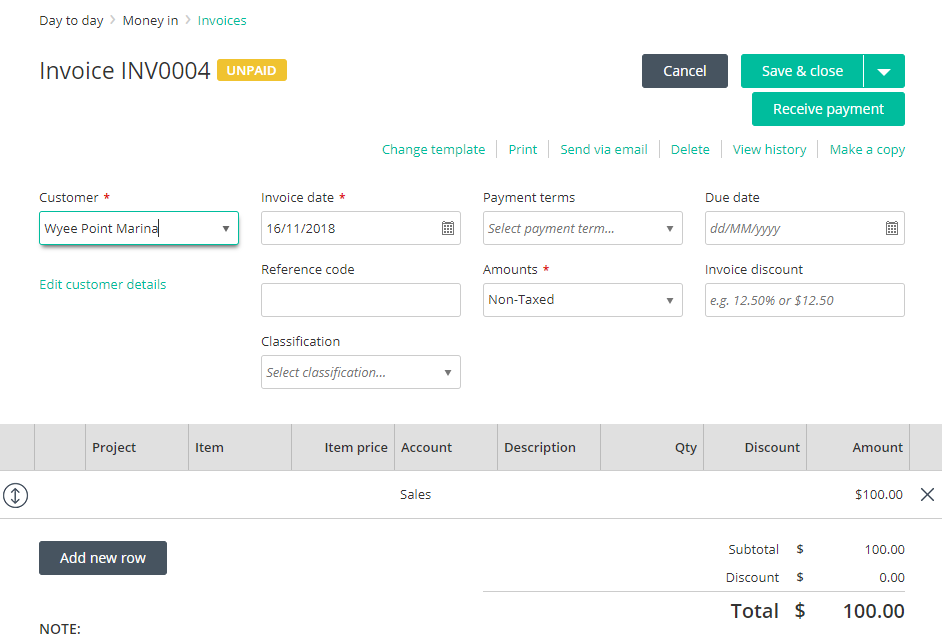
AmountTaxStatus = 1 (non-taxed) with AccountId and no discount.
 {
     "CustomerID": "GUID or text",
     "InvoiceAmount": 100,
     "InvoiceDate": "2018-11-16",
     "AmountTaxStatus": 1,
     "LineItems": [
         {
             "LineNo": 1,
             "AmountExTax": 100,
             "AccountId": "GUID or text"
         }
     ]
}
UI:
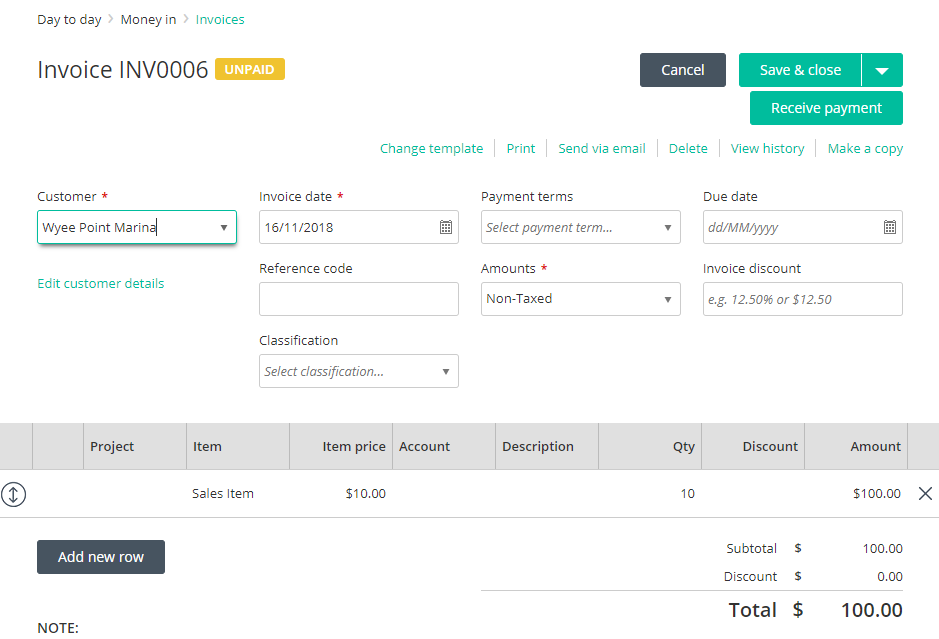
AmountTaxStatus = 1 (non-taxed), ChargeableItemId and , no discount).
{
     "CustomerID": "GUID or text",
     "InvoiceAmount": 100,
     "InvoiceDate": "2018-11-16",
     "AmountTaxStatus": 1,
     "LineItems": [
         {
             "LineNo": 1,
             "AmountExTax": 100,
             "UnitPriceExTax": 10,
             "Quantity": 10,
             "ChargeableItemId": "GUID or text"
         }
     ]
}
UI:
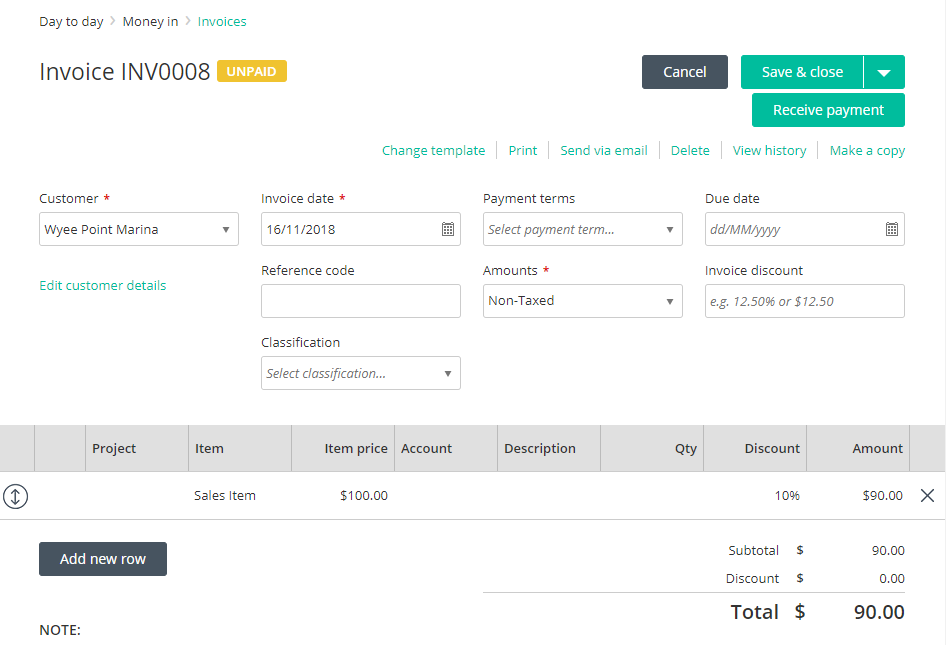
AmountTaxStatus = 1 (non-taxed), ChargeableItemId and a line discount.
{
     "CustomerID": "GUID or text",
     "InvoiceAmount": 90,
     "InvoiceDate": "2018-11-16",
     "AmountTaxStatus": 1,
     "LineItems": [
         {
             "LineNo": 1,
             "AmountExTax": 90,
             "UnitPriceExTax": 100,
             "InvoiceDiscountedAmountExTax": 90,
             "ChargeableItemId": "GUID or text",
             "DiscountPercent": 10
         }
     ]
}
UI:
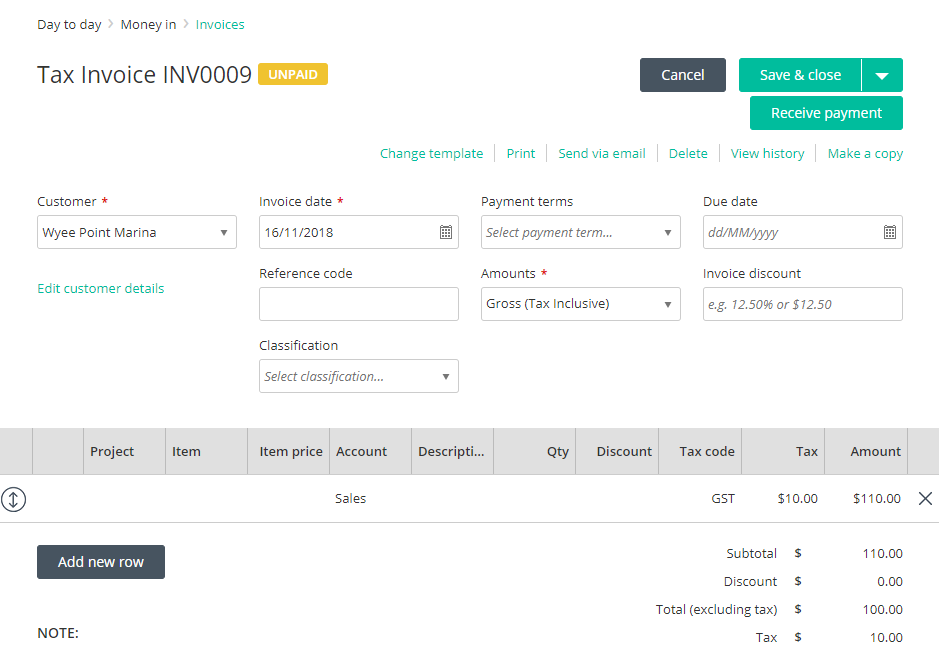
AmountTaxStatus = 2 (Gross: Tax inclusive) with AccountId.
{
     "CustomerID": "GUID or text",
     "InvoiceAmount": 110,
     "InvoiceTax": 10,
     "InvoiceDate": "2018-11-16",
     "AmountTaxStatus": 2,
     "LineItems": [
         {
             "LineNo": 1,
             "AmountExTax": 100,
             "TaxAmount": 10,
             "TaxGroupId": "GUID or text",
             "AccountId": "GUID or text"
         }
     ]
}
UI:
AmountTaxStatus = 2 (Gross: Tax inclusive), AccountId, no discount and AutoCalcTax = true.
{
     "CustomerID": "GUID or text",
     "InvoiceAmount": 110,
     "AmountTaxStatus": 2,
     "InvoiceDate": "2018-11-16",
     "LineItems": [
         {
             "Amount": 110,
             "AccountId": "GUID or text",
             "TaxGroupId": "GUID or text",
             "AutoCalcTax": true
         }
     ]
}
UI:
AmountTaxStatus = 2 (Gross: Tax inclusive), ChargeableItemId and no discount.
{
     "CustomerID": "GUID or text",
     "InvoiceAmount": 110,
     "InvoiceTax": 10,
     "InvoiceDate": "2018-11-16",
     "AmountTaxStatus": 2,
     "LineItems": [
         {
             "LineNo": 1,
             "AmountExTax": 100,
             "TaxAmount": 10,
             "UnitPriceExTax": 100,
             "UnitPriceTax": 10,
             "TaxGroupId": "GUID or text",
             "ChargeableItemId": "GUID or text"
         }
     ]
}
UI:
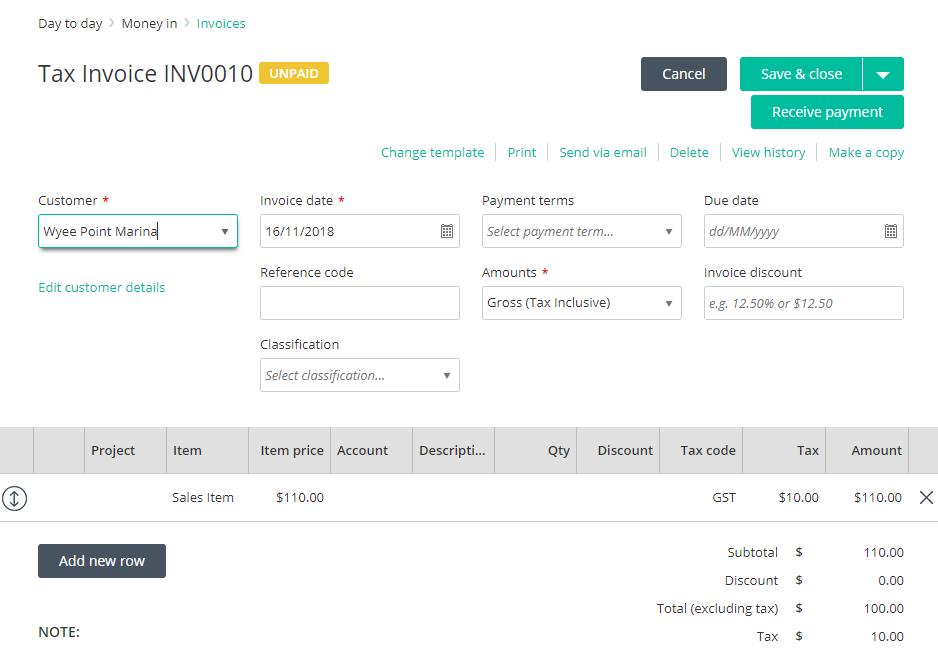
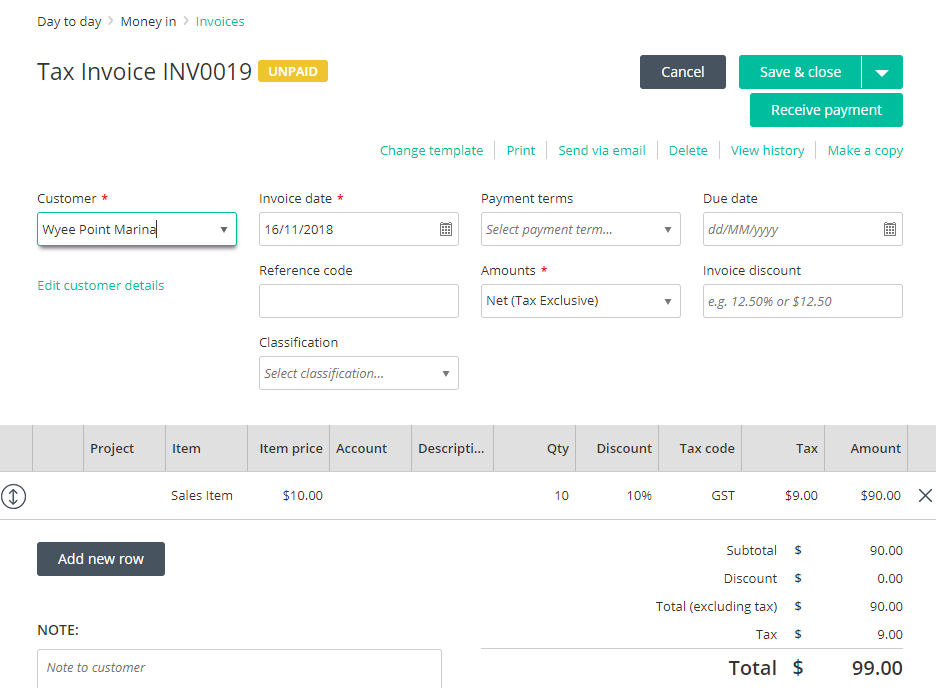
AmountTaxStatus = 2 (Gross: Tax inclusive), ChargeableItemId with discount.
{
     "CustomerID": "GUID or text",
     "InvoiceAmount": 99,
     "InvoiceTax": 9,
     "InvoiceDate": "2018-11-16",
     "AmountTaxStatus": 2,
     "LineItems": [
         {
             "LineNo": 1,
             "AmountExTax": 90,
             "TaxAmount": 9,
             "UnitPriceExTax": 100,
             "UnitPriceTax": 10,
             "InvoiceDiscountedAmountExTax": 90,
             "InvoiceDiscountedTaxAmount": 9,
             "TaxGroupId": "GUID or text",
             "ChargeableItemId": "GUID or text",
             "DiscountPercent": 10
         }
     ]
}
UI:
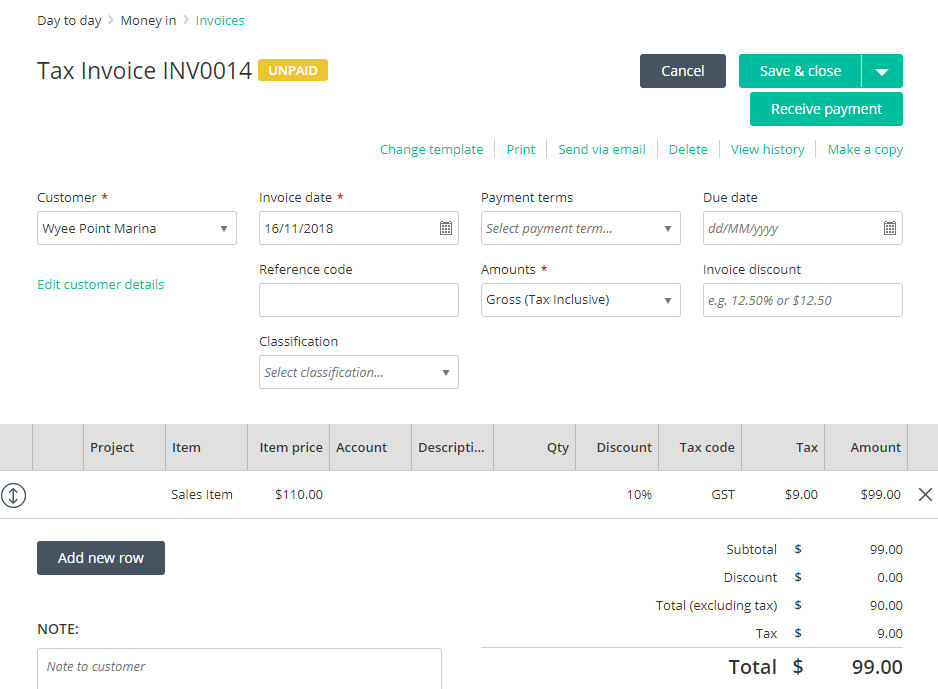
AmountTaxStatus = 2 (Gross: Tax inclusive), ChargeableItemId, no discount, AutoCalcTax = true.
{
     "CustomerID": "GUID or text",
     "InvoiceAmount": 100,
     "AmountTaxStatus": 2,
     "InvoiceDate": "2018-11-16",
     "LineItems": [
         {
             "Amount": 100,
             "ChargeableItemId": "GUID or text",
             "Quantity": 7,
             "TaxGroupId": "GUID or text",
             "AutoCalcTax": true
         }
     ]
}
UI:
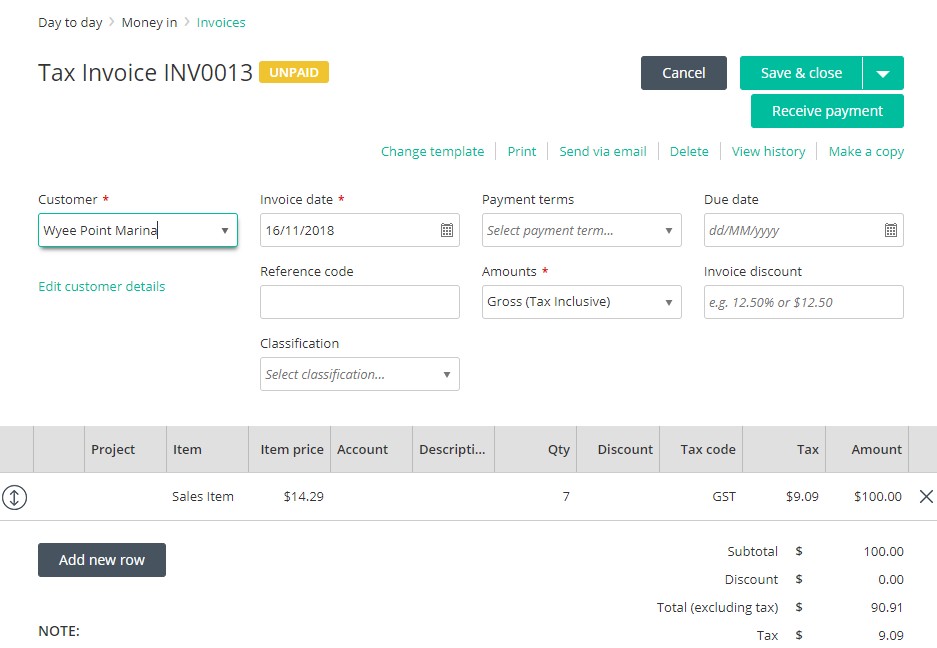
AmountTaxStatus = 3 (Net: Tax exclusive), ChargeableItemId and line discount.
{
     "CustomerID": "GUID or text",
     "InvoiceAmount": 99,
     "InvoiceTax": 9,
     "InvoiceDate": "2018-11-16",
     "AmountTaxStatus": 2,
     "LineItems": [
         {
             "LineNo": 1,
             "AmountExTax": 90,
             "TaxAmount": 9,
             "UnitPriceExTax": 100,
             "UnitPriceTax": 10,
             "InvoiceDiscountedAmountExTax": 90,
             "InvoiceDiscountedTaxAmount": 9,
             "TaxGroupId": "GUID or text",
             "ChargeableItemId": "GUID or text",
             "DiscountPercent": 10
         }
     ]
}
UI:
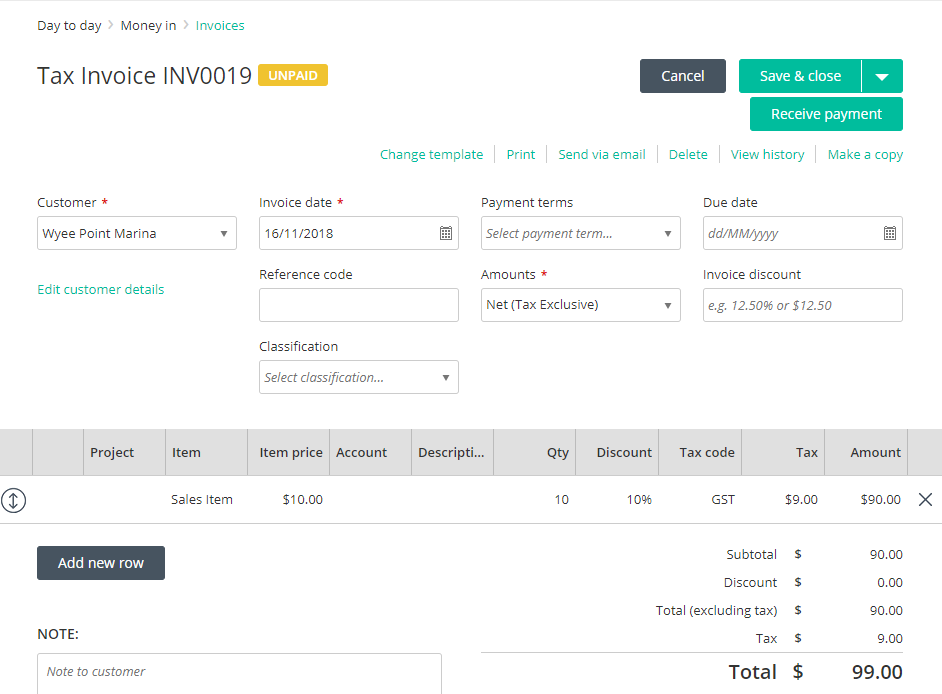
AmountTaxStatus = 3 (Net: Tax exclusive) and AccountId with no discount.
{
     "CustomerID": "GUID or text",
     "InvoiceAmount": 110,
     "InvoiceTax": 10,
     "InvoiceDate": "2018-11-16",
     "AmountTaxStatus": 3,
     "LineItems": [
         {
             "LineNo": 1,
             "AmountExTax": 100,
             "TaxAmount": 10,
             "TaxGroupId": "fGUID or text",
             "AccountId": "GUID or text"
         }
     ]
}
UI:
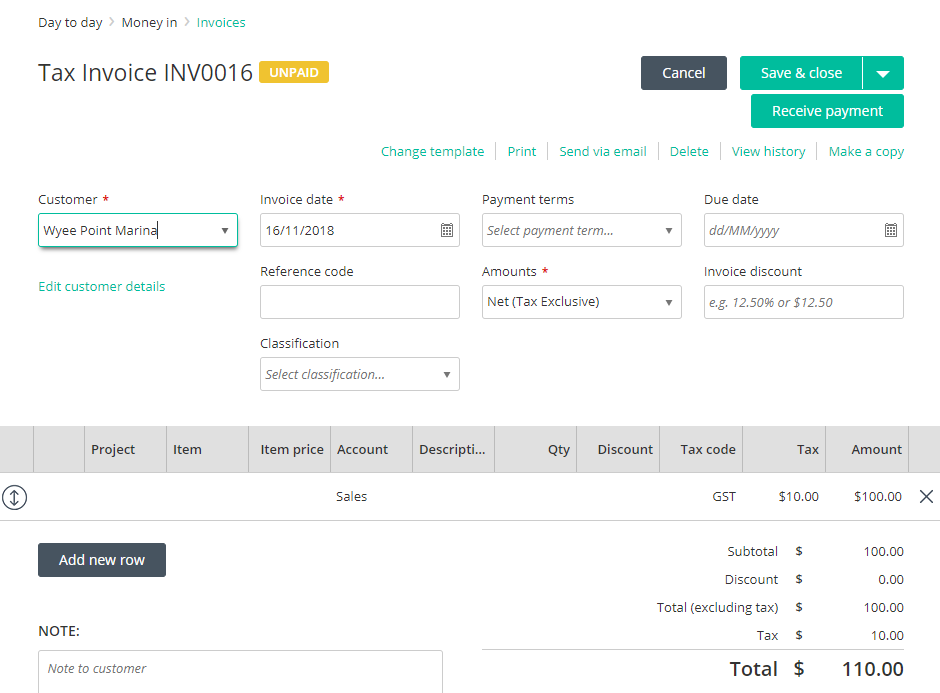
AmountTaxStatus = 3 (Net: Tax exclusive) , AccountId, no discount and AutoCalcTax = true.
{
     "CustomerID": "GUID or text",
     "InvoiceAmount": 100,
     "AmountTaxStatus": 3,
     "InvoiceDate": "2018-11-16",
     "LineItems": [
         {
             "Amount": 100,
             "AccountId": "GUID or text",
             "TaxGroupId": "GUID or text",
             "AutoCalcTax": true
         }
     ]
}
UI:
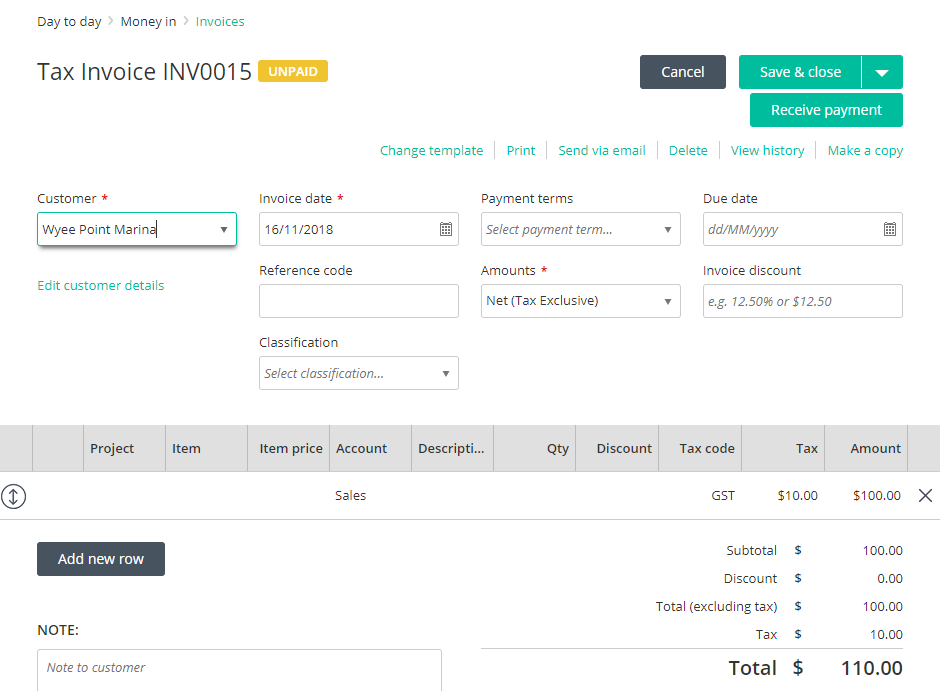
GET with AutoCalcTax
The GET for this post will return InvoiceAmount = $110 as we used AutoCalcTax to calculate the GST (10%) on a tax exclusive amount of $100.00
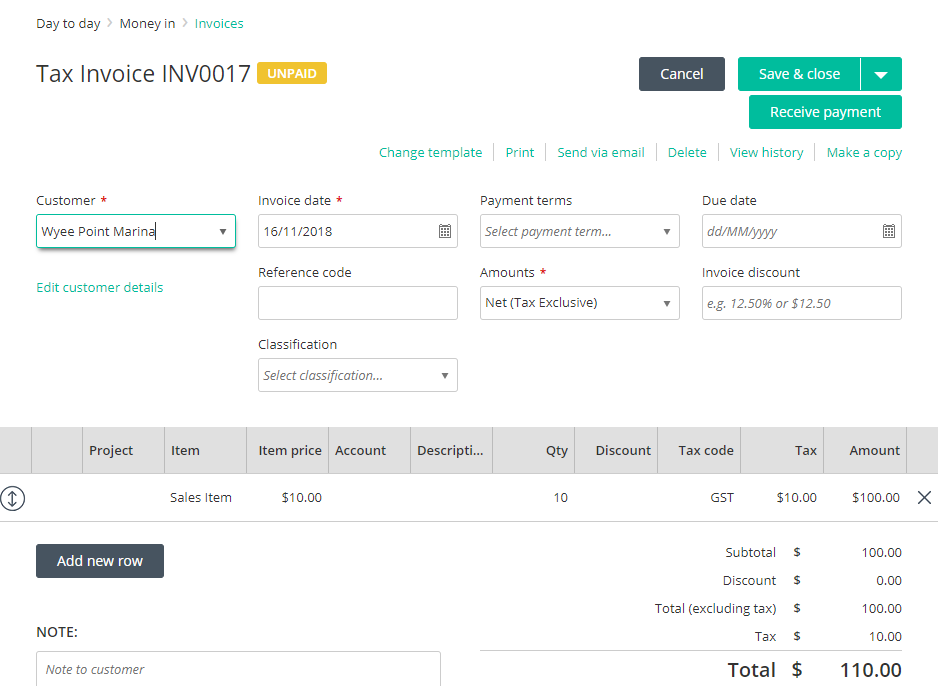
AmountTaxStatus = 3 (Net: Tax exclusive), ChargeableItemId and no discount.
{
     "CustomerID": "GUID or text",
     "InvoiceAmount": 110,
     "InvoiceTax": 10,
     "InvoiceDate": "2018-11-16",
     "AmountTaxStatus": 3,
     "LineItems": [
         {
             "LineNo": 1,
             "AmountExTax": 100,
             "TaxAmount": 10,
             "UnitPriceExTax": 10,
             "UnitPriceTax": 1,
             "Quantity": 10,
             "TaxGroupId": "GUID or text",
             "ChargeableItemId": "GUID or text"
         }
     ]
}
UI:
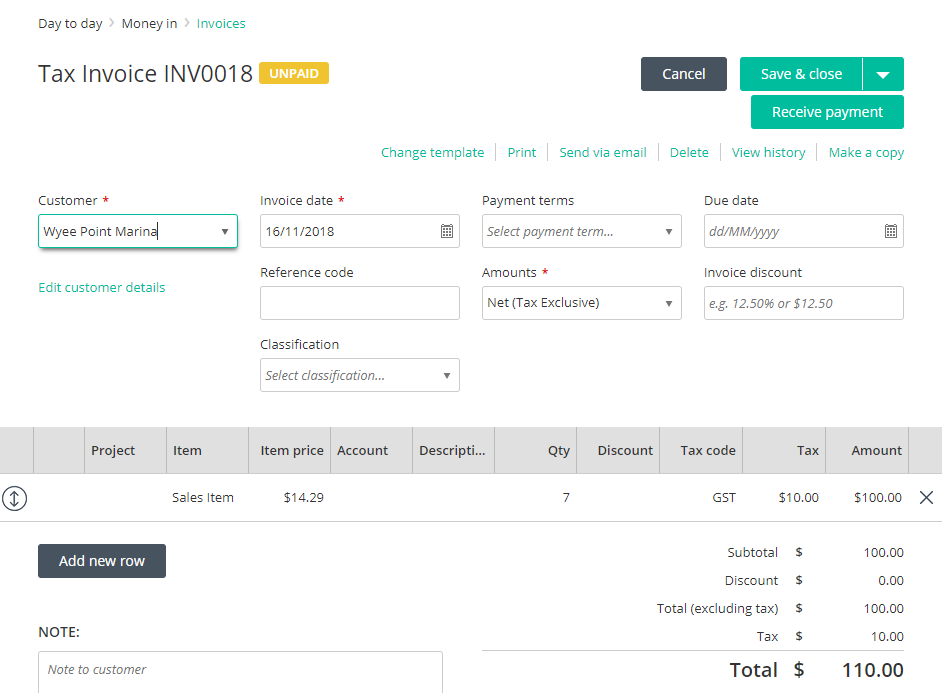
AmountTaxStatus = 3 (Net: Tax exclusive), ChargeableItemId, no discount, AutoCalcTax = true.
{
     "CustomerID": "29fb56d2-6220-49fc-8109-39281f1570a7",
     "InvoiceAmount": 100,
     "AmountTaxStatus": 3,
     "InvoiceDate": "2018-11-16",
     "LineItems": [
         {
             "Amount": 100,
             "ChargeableItemId": "e8747ac0-e3b0-4992-8f6d-13d275045584",
             "Quantity": 7,
             "TaxGroupId": "fe43ca25-f4d4-47a6-bf48-c195558cefb4",
             "AutoCalcTax": true
         }
     ]
}
UI:
AmountTaxStatus = 3 (Net: Tax exclusive), ChargeableItemId and line discount.
{
     "CustomerID": "GUID or text7",
     "InvoiceAmount": 99,
     "InvoiceTax": 9,
     "InvoiceDate": "2018-11-16",
     "AmountTaxStatus": 3,
     "LineItems": [
         {
             "LineNo": 1,
             "AmountExTax": 90,
             "TaxAmount": 9,
             "UnitPriceExTax": 10,
             "UnitPriceTax": 1,
             "Quantity": 10,
             "InvoiceDiscountedAmountExTax": 90,
             "InvoiceDiscountedTaxAmount": 9,
             "TaxGroupId": "GUID or text",
             "ChargeableItemId": "GUID or text",
             "DiscountPercent": 10
         }
     ]
}
UI:
Details of each object
Data Field | Reckon One Data Location | Data Type |
Details | Detailed information about the invoice entered by the user | Text |
CustomerID | The GUID or NAME of the customer that the invoice is for | GUID/Text |
AmountTaxStatus | Whether the invoice is tax inclusive or not | Set data types:
|
InvoiceAmount | The total amount of the invoice | Number |
InvoiceDiscountAmount | The total discount amount of the invoice | Number |
InvoiceDiscountPercentage | The total discount amount as a percentage of the invoice | Number |
InvoiceTax | The total amount of the tax of the invoice | Number (Must calculate correctly to total invoice) |
Notes | Any notes for the invoice. Character limit: up to 1000 characters | Text |
Reference | Reference notes for the invoice Character limit: up to 50 characters | Text |
PurchaseDescription | The description of the purchase | Text |
TermID | The GUID or Name of the term for the invoice | GUID or Text TermID can be found from terms endpoint |
TemplateID | The GUID or NAME of the template for the invoice | GUID or Text |
InvoiceDate | Date of the invoice | DateTime |
DueDate | The due date of the invoice | DueDate |
Status | The status of the Invoice | Data types:
|
LineItems |
| Array |
DiscountAmountExTax | Amount of a discount excluding the tax component for that line of the invoice | Number |
DiscountAmountTax | Amount of a discount including the tax amount for that line of the invoice | Number |
DiscountPercent | Amount of a discount for the line as a percentage | Number |
Amount | Amount of the line | Number |
InvoiceDiscountedAmountExTax | The Amount of Invoice line when discounted without tax component | Number |
InvoiceDiscountedTaxAmount | The amount of tax for the invoice line when discounted | Number |
IsHidden | Whether the line is hidden on the invoice or not | Boolean – True/False |
HasDataForPosting | If not set to true this will post as a non-posting transaction which cannot be currently changed in the UI. ** POST AS TRUE. | Boolean - True/False |
ChargeableItemId | GUID or NAME of the item being applied to the invoice line | GUID/Text |
Line No | The Line of the Invoice. **Each new line must be a new number and an individual array. | Number |
AccountId | The GUID or NAME of the account if an account not a item is being used on the invoice line | GUID/Text |
Description | Description for the line Character limit: up to 1000 characters | Text |
Quantity | The amount of the item being sold | Number |
ProjectId | The ID or NAME of a project being assigned to that line | GUID/Text |
UnitPriceExTax | The unit price of the line excluding tax | Number |
UnitPriceTax | The tax amount being applied to each unit on the line | Number |
UnitPriceIsTaxInclusive | Whether the Unit price should be deemed tax inclusive on the invoice | Boolean – True/False |
TaxGroupID | The Tax code's GUID or NAME to apply to the line | GUID/Text Can be obtained via the Tax Groups endpoint |
TaxIsModified | If its false, your tax calculations will be compared against the Reckon One tax engine and if it does not match the transaction is blocked. If set to true, the engine is not checked and you can post any tax you desire. The UI also controls this function via SETTINGS for the same purpose. | Boolean – True/false |
AutoCalcTax | Allows Reckon to calculate the tax. You send the net amounts to us including "AutoCalcTax": true and a TaxGroupId in the payload, and our tax engine figures out what the tax should be. It also means that by using that you are always complying with and using the R1 tax engine. ** Was not available in early API versions. | Boolean: true/false |
TaxAmount | Tax amount for the line | Number |
AmountExTax | The amount of the line excluding tax | Number |
PaymentDetails | Payment Details text from the Invoice Character limit: up to 500 characters | Text |
